이전에 스폰과 디스폰을 구현해서 다른 클라이언트의 접속도 내 클라이언트에 스폰되게 하고, 플레이어가 q를 눌러 메인메뉴로 나가면 다른 클라이언트들에서도 디스폰되도록 만들었다.
이번엔 이동 동기화를 구현해서 내 움직임을 다른 클라에서도 보이도록 만들어보자.
이전에 정리해뒀던 강의내용을 보면서 만들었다.
4. 이동 동기화
지난번에는 접속과 퇴장을 관리해봤다.입장은 언리얼 에디터에서 ▶ 를 누르면 여러 클라이언트를 동시에 실행시키고 서버와 접속해 플레이어를 소환시킨다. 그리고 각각의 클라이언트가 보는
dodontak.tistory.com
Input 부분은 유튜브 강의를 참고해서 새로 만들었다.
ClientPlayer, ClientMyPlayer 클래스 만들기
54. 스폰 디스폰 에서는 ParagonPhase 에서 제공하는 블루프린트를 썼는데, 내가 직접 커스텀할 수 있게 새로 만들자.
나와 다른 유저를 구분하기 위해 두개의 언리얼 에디터에서 클래스를 만들어준다. 캐릭터를 상속받은 ClientPlayer는 Room에 접속한 나를 제외한 다른 유저 캐릭터들이고
ClientPlayer 를 상속받은 ClientMyPlayer는 Room에 접속한 내 캐릭터다.

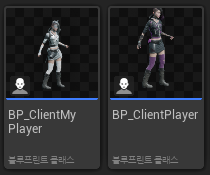
c++클래스로 블루프린트도 만들어주고, 굳이 할 필요는 없지만 동일하지만 스킨이 다른 스켈레탈 메시를 적용시켜봤다.
ClientPlayer에는 내 플레이어에만 있으면 되는 기능을 전부 뺄것이다. 예를 들어 팔로우 카메라, 입력, 빙의 같은 내가 컨트롤 하는 캐릭터에만 필요한 기능들.
아래 파일들은 이동 동기화 완성이후 복붙한 내용임.
ClientPlayer.h
#pragma once

#include "CoreMinimal.h"
#include "GameFramework/Character.h"
#include "Logging/LogMacros.h"
#include "ClientPlayer.generated.h"

namespace Protocol
{
	class Position;
	class PlayerInfo;
}

class USpringArmComponent;
class UCameraComponent;
class UInputAction;
struct FInputActionValue;

UCLASS()
class CLIENT_API AClientPlayer : public ACharacter
{
	GENERATED_BODY()

public:
	/** Constructor */
	AClientPlayer();
	virtual ~AClientPlayer() override;

public:
	virtual void Tick(float DeltaTime) override;

public:
	bool IsMyPlayer();

	const Protocol::Position& GetPlayerPosition() const;
	UFUNCTION(BlueprintPure)
	float GetSpeed() const { return Speed; }
	uint64 GetObjectId();

	void SetPlayerInfo(const Protocol::PlayerInfo& PlayerInfo_);
	void SetDestInfo(const Protocol::Position& DestInfo_);
	void SetSpeed(float Speed_) { Speed = Speed_; }

protected:
	Protocol::PlayerInfo* PlayerInfo;
	Protocol::Position* DestInfo;
	float Speed;
};
cpp
#include "Game/ClientPlayer.h"
#include "Engine/LocalPlayer.h"
#include "Components/CapsuleComponent.h"
#include "GameFramework/CharacterMovementComponent.h"
#include "GameFramework/Controller.h"
#include "ClientMyPlayer.h"
#include "Struct.pb.h"

AClientPlayer::AClientPlayer()
{
	// Set size for collision capsule
	GetCapsuleComponent()->InitCapsuleSize(42.f, 96.0f);

	// Don't rotate when the controller rotates. Let that just affect the camera.
	bUseControllerRotationPitch = false;
	bUseControllerRotationYaw = false;
	bUseControllerRotationRoll = false;

	// Configure character movement
	GetCharacterMovement()->bOrientRotationToMovement = true;
	GetCharacterMovement()->RotationRate = FRotator(0.0f, 500.0f, 0.0f);

	// Note: For faster iteration times these variables, and many more, can be tweaked in the Character Blueprint
	// instead of recompiling to adjust them
	GetCharacterMovement()->JumpZVelocity = 500.f;
	GetCharacterMovement()->AirControl = 0.35f;
	GetCharacterMovement()->MaxWalkSpeed = 500.f;
	GetCharacterMovement()->MinAnalogWalkSpeed = 20.f;
	GetCharacterMovement()->BrakingDecelerationWalking = 2000.f;
	GetCharacterMovement()->BrakingDecelerationFalling = 1500.0f;

	// Note: The skeletal mesh and anim blueprint references on the Mesh component (inherited from Character)
	// are set in the derived blueprint asset named ThirdPersonCharacter (to avoid direct content references in C++)

	PlayerInfo = new Protocol::PlayerInfo();
	DestInfo = new Protocol::Position();
}

AClientPlayer::~AClientPlayer()
{
	delete PlayerInfo;
	delete DestInfo;
	PlayerInfo = nullptr;
	DestInfo = nullptr;
}

void AClientPlayer::Tick(float DeltaTime)
{
	Super::Tick(DeltaTime);

	if (IsMyPlayer() == false)
	{
		FVector Location = GetActorLocation();
		FVector DestLocation = FVector(DestInfo->x(), DestInfo->y(), DestInfo->z());
		FRotator DestRotation = FRotator(DestInfo->pitch(), DestInfo->yaw(), DestInfo->roll());

		// Location 보간
		FVector MoveDir = (DestLocation - Location);
		const float DistToDest = MoveDir.Length();
		MoveDir.Normalize();

		float MoveDist = (MoveDir * FMath::Max(Speed, 450.0f) * DeltaTime).Length();
		MoveDist = FMath::Min(MoveDist, DistToDest);
		SetActorLocation(Location + MoveDir * MoveDist);

		// Rotation 보간
		FRotator CurrentRotation = GetActorRotation();
		FRotator NewRotation = FMath::RInterpTo(CurrentRotation, DestRotation, DeltaTime, 10.0f);
		SetActorRotation(NewRotation);
	}
}

void AClientPlayer::SetPlayerInfo(const Protocol::PlayerInfo& PlayerInfo_)
{
	PlayerInfo->CopyFrom(PlayerInfo_);
}

void AClientPlayer::SetDestInfo(const Protocol::Position& DestInfo_)
{
	DestInfo->CopyFrom(DestInfo_);
}

const Protocol::Position& AClientPlayer::GetPlayerPosition() const
{
	return PlayerInfo->pos();
}

uint64 AClientPlayer::GetObjectId()
{
	if (PlayerInfo == nullptr)
		return 0;
	return PlayerInfo->id();
}

bool AClientPlayer::IsMyPlayer()
{
	return Cast<AClientMyPlayer>(this) != nullptr;
}
ClientMyPlayer.h
#pragma once

#include "CoreMinimal.h"
#include "Game/ClientPlayer.h"
#include "Logging/LogMacros.h"
#include "ClientMyPlayer.generated.h"

class USpringArmComponent;
class UCameraComponent;
class UInputAction;
struct FInputActionValue;
class UInputMappingContext;

UCLASS()
class CLIENT_API AClientMyPlayer : public AClientPlayer
{
	GENERATED_BODY()

	/** Camera boom positioning the camera behind the character */
	UPROPERTY(VisibleAnywhere, BlueprintReadOnly, Category="Components", meta = (AllowPrivateAccess = "true"))
	USpringArmComponent* CameraBoom;

	/** Follow camera */
	UPROPERTY(VisibleAnywhere, BlueprintReadOnly, Category="Components", meta = (AllowPrivateAccess = "true"))
	UCameraComponent* FollowCamera;
protected:
	virtual void Tick( float DeltaTime ) override;
	virtual void PossessedBy(AController* NewController) override;

	UPROPERTY(EditAnywhere, Category="Input")
	UInputMappingContext* DefaultMappingContext;

	UPROPERTY(EditAnywhere, Category="Input")
	UInputMappingContext* MouseLookMappingContext;

protected:

	/** Jump Input Action */
	UPROPERTY(EditAnywhere, Category="Input")
	UInputAction* JumpAction;

	/** Move Input Action */
	UPROPERTY(EditAnywhere, Category="Input")
	UInputAction* MoveAction;

	/** Mouse Look Input Action */
	UPROPERTY(EditAnywhere, Category="Input")
	UInputAction* MouseLookAction;

public:

	/** Constructor */
	AClientMyPlayer();

protected:

	/** Initialize input action bindings */
	virtual void SetupPlayerInputComponent(class UInputComponent* PlayerInputComponent) override;

protected:

	/** Called for movement input */
	void Move(const FInputActionValue& Value);

	/** Called for looking input */
	void Look(const FInputActionValue& Value);

public:

	/** Handles move inputs from either controls or UI interfaces */
	UFUNCTION(BlueprintCallable, Category="Input")
	virtual void DoMove(float Right, float Forward);

	/** Handles look inputs from either controls or UI interfaces */
	UFUNCTION(BlueprintCallable, Category="Input")
	virtual void DoLook(float Yaw, float Pitch);

	/** Handles jump pressed inputs from either controls or UI interfaces */
	UFUNCTION(BlueprintCallable, Category="Input")
	virtual void DoJumpStart();

	/** Handles jump pressed inputs from either controls or UI interfaces */
	UFUNCTION(BlueprintCallable, Category="Input")
	virtual void DoJumpEnd();

public:

	/** Returns CameraBoom subobject **/
	FORCEINLINE class USpringArmComponent* GetCameraBoom() const { return CameraBoom; }

	/** Returns FollowCamera subobject **/
	FORCEINLINE class UCameraComponent* GetFollowCamera() const { return FollowCamera; }

private:
	const float MOVE_PACKET_SEND_DELAY = 0.2f;
	float MovePacketSendTimer = MOVE_PACKET_SEND_DELAY;
};
cpp
#include "Game/ClientMyPlayer.h"

#include "ClientGameInstance.h"
#include "EnhancedInputComponent.h"
#include "EnhancedInputSubsystems.h"
#include "Protocol.pb.h"
#include "ServerPacketHandler.h"
#include "Camera/CameraComponent.h"
#include "GameFramework/SpringArmComponent.h"

void AClientMyPlayer::Tick(float DeltaTime)
{
	Super::Tick(DeltaTime);

	{
		FVector Location = GetActorLocation();
		FRotator Rotation = GetActorRotation();
		Protocol::Position* Pos = PlayerInfo->mutable_pos();

		Pos->set_x(Location.X);
		Pos->set_y(Location.Y);
		Pos->set_z(Location.Z);
		Pos->set_pitch(Rotation.Pitch);
		Pos->set_yaw(Rotation.Yaw);
		Pos->set_roll(Rotation.Roll);
	}

	MovePacketSendTimer -= DeltaTime;
	if (MovePacketSendTimer <= 0)
	{
		MovePacketSendTimer = MOVE_PACKET_SEND_DELAY;

		Protocol::GC_MOVE MovePacket;
		Protocol::Position* Pos = MovePacket.mutable_dest();
		Pos->CopyFrom(PlayerInfo->pos());
		MovePacket.set_speed(GetVelocity().Length());

		Cast<UClientGameInstance>(GWorld->GetGameInstance())->SendPacket(
			ServerPacketHandler::MakeSendBuffer(MovePacket));
	}
}

void AClientMyPlayer::PossessedBy(AController* NewController)
{
	Super::PossessedBy(NewController);

	if (APlayerController* PlayerController = Cast<APlayerController>(GetController()))
	{
		if (UEnhancedInputLocalPlayerSubsystem* Subsystem = ULocalPlayer::GetSubsystem<
			UEnhancedInputLocalPlayerSubsystem>(PlayerController->GetLocalPlayer()))
		{
			Subsystem->AddMappingContext(DefaultMappingContext, 0);
			Subsystem->AddMappingContext(MouseLookMappingContext, 0);
		}
	}
}

AClientMyPlayer::AClientMyPlayer()
{
	// Create a camera boom (pulls in towards the player if there is a collision)
	CameraBoom = CreateDefaultSubobject<USpringArmComponent>(TEXT("CameraBoom"));
	CameraBoom->SetupAttachment(RootComponent);
	CameraBoom->TargetArmLength = 400.0f;
	CameraBoom->bUsePawnControlRotation = true;

	// Create a follow camera
	FollowCamera = CreateDefaultSubobject<UCameraComponent>(TEXT("FollowCamera"));
	FollowCamera->SetupAttachment(CameraBoom, USpringArmComponent::SocketName);
	FollowCamera->bUsePawnControlRotation = false;

	// Note: The skeletal mesh and anim blueprint references on the Mesh component (inherited from Character)
	// are set in the derived blueprint asset named ThirdPersonCharacter (to avoid direct content references in C++)
}

void AClientMyPlayer::SetupPlayerInputComponent(UInputComponent* PlayerInputComponent)
{
	// Set up action bindings
	if (UEnhancedInputComponent* EnhancedInputComponent = Cast<UEnhancedInputComponent>(PlayerInputComponent))
	{
		// Jumping
		EnhancedInputComponent->BindAction(JumpAction, ETriggerEvent::Started, this, &ACharacter::Jump);
		EnhancedInputComponent->BindAction(JumpAction, ETriggerEvent::Completed, this, &ACharacter::StopJumping);

		// Moving
		EnhancedInputComponent->BindAction(MoveAction, ETriggerEvent::Triggered, this, &AClientMyPlayer::Move);

		// Looking
		EnhancedInputComponent->BindAction(MouseLookAction, ETriggerEvent::Triggered, this, &AClientMyPlayer::Look);
	}
	else
	{
		UE_LOG(LogTemp, Error,
		       TEXT(
			       "'%s' Failed to find an Enhanced Input component! This template is built to use the Enhanced Input system. If you intend to use the legacy system, then you will need to update this C++ file."
		       ), *GetNameSafe(this));
	}
}

void AClientMyPlayer::Move(const FInputActionValue& Value)
{
	// input is a Vector2D
	FVector2D MovementVector = Value.Get<FVector2D>();

	// route the input
	DoMove(MovementVector.X, MovementVector.Y);
}

void AClientMyPlayer::Look(const FInputActionValue& Value)
{
	// input is a Vector2D
	FVector2D LookAxisVector = Value.Get<FVector2D>();

	// route the input
	DoLook(LookAxisVector.X, LookAxisVector.Y);
}

void AClientMyPlayer::DoMove(float Right, float Forward)
{
	if (GetController() != nullptr)
	{
		// find out which way is forward
		const FRotator Rotation = GetController()->GetControlRotation();
		const FRotator YawRotation(0, Rotation.Yaw, 0);

		// get forward vector
		const FVector ForwardDirection = FRotationMatrix(YawRotation).GetUnitAxis(EAxis::X);

		// get right vector
		const FVector RightDirection = FRotationMatrix(YawRotation).GetUnitAxis(EAxis::Y);

		// add movement
		AddMovementInput(ForwardDirection, Forward);
		AddMovementInput(RightDirection, Right);
	}
}

void AClientMyPlayer::DoLook(float Yaw, float Pitch)
{
	if (GetController() != nullptr)
	{
		// add yaw and pitch input to controller
		AddControllerYawInput(Yaw);
		AddControllerPitchInput(Pitch);
	}
}

void AClientMyPlayer::DoJumpStart()
{
	// signal the character to jump
	Jump();
}

void AClientMyPlayer::DoJumpEnd()
{
	// signal the character to stop jumping
	StopJumping();
}
GameMode 블루프린트 만들기
지금은 디폴트 게임모드를 쓰는데 사용하지 않는 구 형태의 디폴트 폰을 소환한다.
이걸 제거하기 위해 내 게임모드를 만들어 사용하자.
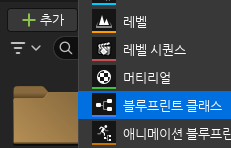

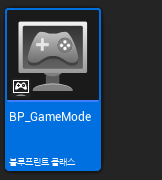
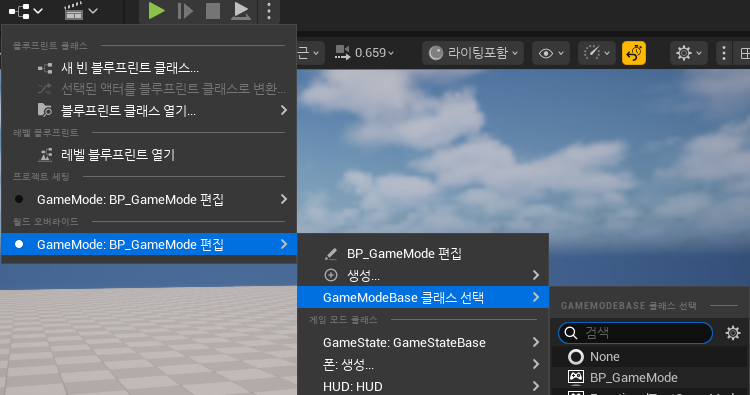
게임모드 베이스 블루프린트를 만들어서 모든 맵에 적용시켜주자.

그리고 디폴트 폰을 None으로 설정해서 디폴트 폰 스폰을 제거했다.
입력 구현하기
새 캐릭터 클래스로 바꾸면서 이동이 안된다.
이전에는 에셋에 딸려있는 블루프린트를 써서 알아서 잘 됐는데 새로 만들었으니 직접 만들어줘야한다.
아래 영상을 참조해 언리얼 5의 Enhanced Input System이라는걸 써서 만들어봤다. (비교적 새로 나온 기능이지만 지금은 어느정도 자리잡았다고 함.)
- 콘텐츠 드로어에서 입력액션과 입력 매핑 컨텍스트를 만들어준다
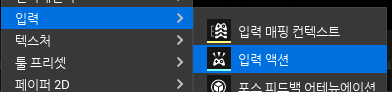
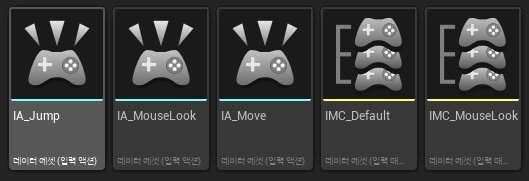
- IA_Jump
파일을 에디터에서 열어 값 타입을 Digital로 설정 (기본값임)
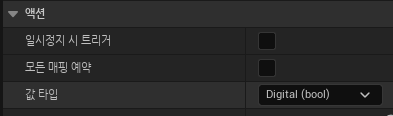
- IA_MouseLook, IA_Move
값 타입을 Axis2D로 설정
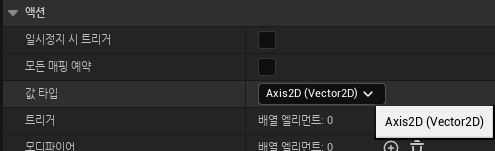
- IMC_Default
아래와 같이 설정한다. 자세한 내용은 영상을 참조하자.
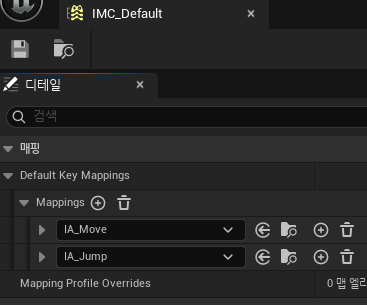
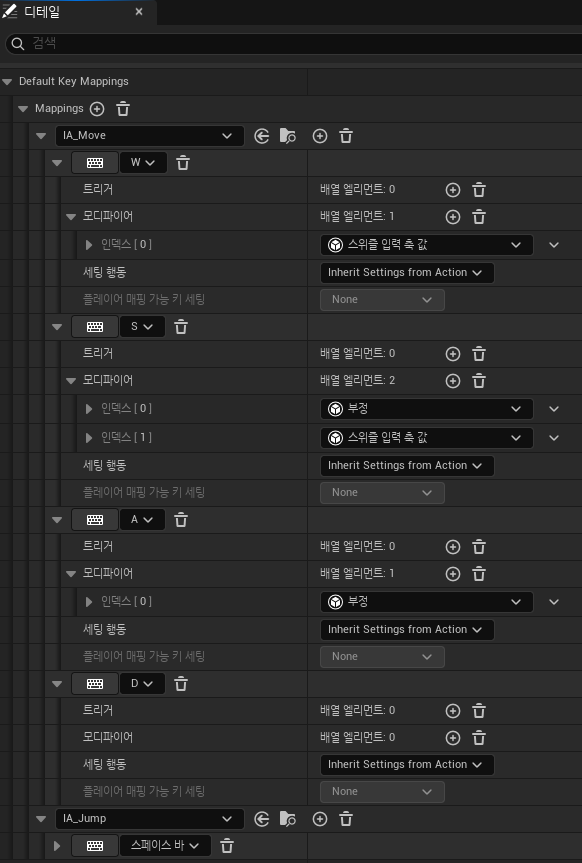
- IMC_MouseLook
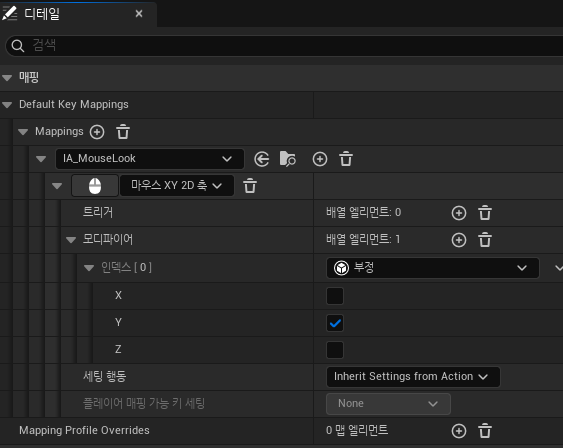
- BP_ClientMyPlayer
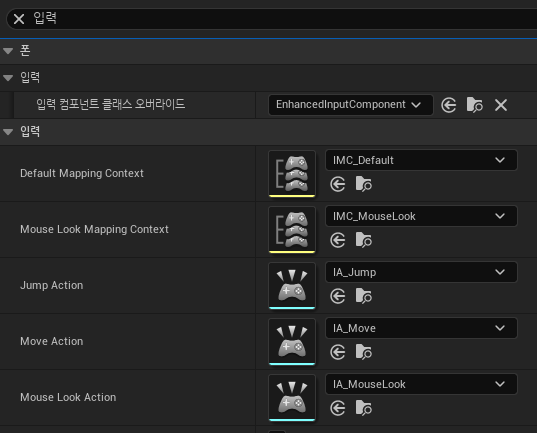
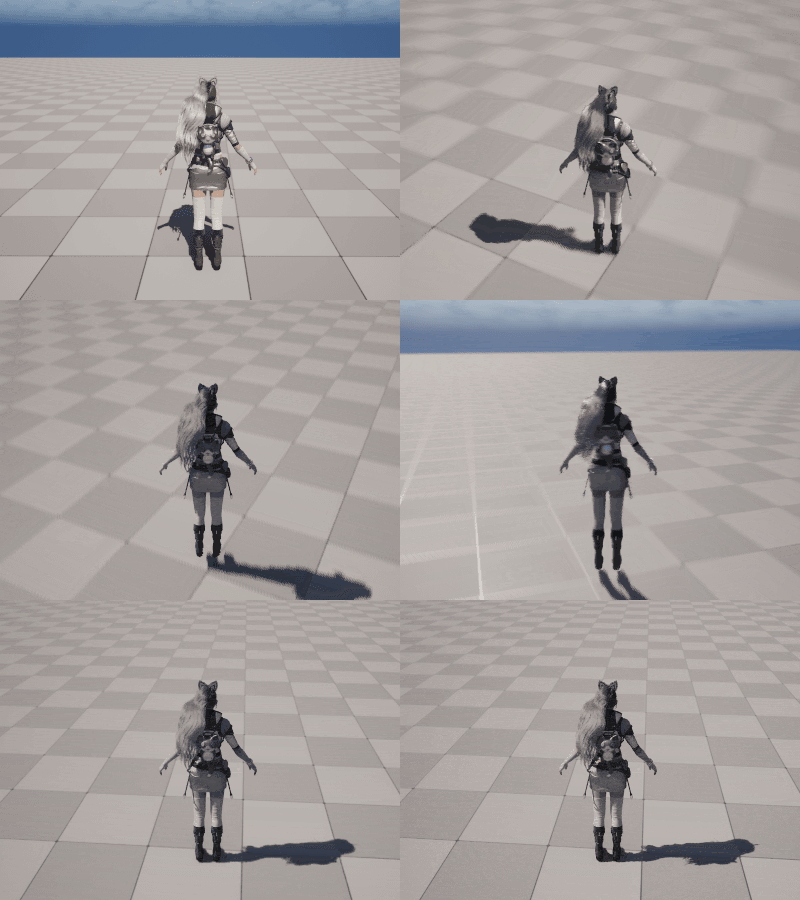
이제 내 캐릭터는 이동이 잘 된다. (애니메이션은 이 글 마지막 단락에서 추가함)
MovePacket
이동 동기화를 위한 설계를 해야하는데, 두가지 방법이 있다.
- 클라이언트가 먼저 움직이고 서버에 알리면 서버가 브로드캐스트 하는 방식
- 클라이언트가 서버에게 이동을 요청하면 서버가 그걸 허락하는 방식
키보드 이동은 주로 1번을 쓰고 마우스 이동은 주로 2번을 쓴다고 한다.
1은 클라이언트 선행 방식으로 입력에 대한 반응이 빠르다 (클라에서 입력 -> 이동을 처리하니까 당연히). 단 서버 검증 전에 이미 움직였기 때문에 핵, 속도치트등에 취약하고 서버와 위치가 다를 경우 보정이 필요하다.
2는 서버 권위 방식으로 모든 위치를 서버가 결정하기 때문에 핵방지에 좋다. 하지만 레이턴시만큼 느려진다.
대부분의 게임은 두가지를 혼용한다고 한다.
FPS는 이동은 1, 피격 판정은 2, 아이템 획득은 2
MMORPG는 이동은 1, 스킬사용은 2, 거래 아이템 획득 등은 2 이런식으로.
일단 이동을 부드럽게 구현하는것이 목적이기 때문에 1의 방법만 사용하여 만들어보자.
Protobuf Protocol 추가/수정
이동패킷을 만들고, Position 구조체에 Rotation 값도 추가해준다.
Protocol.proto
message GC_MOVE {
    Position dest = 1;
    float speed = 2;
}

message GS_MOVE {
    int64 object_id = 1;
    Position dest = 2;
    float speed = 3;
}
Struct.proto
message PlayerInfo
{
	uint64 id = 1;
	string name = 2;
	uint32 level = 3;
	PlayerType playerType = 4;
	Position pos = 5;
}

message Position
{
	float x = 1;
	float y = 2;
	float z = 3;
	float pitch = 4;
	float yaw = 5;
	float roll = 6;
}
아래와 같이 만들어보자.
클라                 서버
---------------------->  GC_MOVE 내 캐릭터가 이동한 위치를 보냄
<----------------------  GS_MOVE 검증후에 접속한 다른유저들에게 알림

다른 플레이어의 이동 패킷을 받으면 클라에서 해당 유저 캐릭터를 이동시킨다.
내 플레이어 위치 보내기
- 위치 저장하기
매 틱마다 클라이언트상의 플레이어의 위치를 PlayerInfo 변수에 저장한다.
class CLIENT_API AClientPlayer : public ACharacter
{
    GENERATED_BODY()
    /*...*/
protected:
    Protocol::PlayerInfo* PlayerInfo;
    /*...*/
};
void AClientMyPlayer::Tick(float DeltaTime)
{
Super::Tick(DeltaTime);
{
FVector Location = GetActorLocation();
FRotator Rotation = GetActorRotation();
Protocol::Position* Pos = PlayerInfo->mutable_pos();
Pos->set_x(Location.X);
Pos->set_y(Location.Y);
Pos->set_z(Location.Z);
Pos->set_pitch(Rotation.Pitch);
Pos->set_yaw(Rotation.Yaw);
Pos->set_roll(Rotation.Roll);
}
/*...*/
}
- "내가 여기로 이동했다" 라고 0.2초마다 서버로 전송하기
내 위치, rotation, speed값을 패킷에 적어 서버로 보낸다.
speed는 애니메이션과 이동속도를 위해 넣었다.
class CLIENT_API AClientMyPlayer : public AClientPlayer
{
    GENERATED_BODY()
	/*...*/
protected:
    virtual void Tick( float DeltaTime ) override;
    /*...*/
private:
    const float MOVE_PACKET_SEND_DELAY = 0.2f;//Move패킷 전송 딜레이 설정
    float MovePacketSendTimer = MOVE_PACKET_SEND_DELAY;
};
void AClientMyPlayer::Tick(float DeltaTime)
{
Super::Tick(DeltaTime);
{
/* 위치 정보 저장 부분 생략 */
}
MovePacketSendTimer -= DeltaTime;
if (MovePacketSendTimer <= 0)//0.2초마다
{
MovePacketSendTimer = MOVE_PACKET_SEND_DELAY;
Protocol::GC_MOVE MovePacket;
Protocol::Position* Pos = MovePacket.mutable_dest();
Pos->CopyFrom(PlayerInfo->pos());
MovePacket.set_speed(GetVelocity().Length());
//패킷 전송
Cast<UClientGameInstance>(GWorld->GetGameInstance())->SendPacket(
ServerPacketHandler::MakeSendBuffer(MovePacket));
}
}
서버에서 처리 Move패킷 처리
Room에 있는 모든 유저들에게 전송한다. (유효성 검사는 TODO로 남겨둠)
void	Handle_GC_MOVE(const PacketSessionRef& session, const Protocol::GC_MOVE& pkt)
{
	GameSessionRef gameSession = static_pointer_cast<GameSession>(session);
	if (gameSession == nullptr)
		return;
	if (gameSession->_player == nullptr)
		return;
	PlayerRef player = gameSession->_player;
	if (player == nullptr)
		return;
	RoomRef room = player->_room.load().lock();

	room->DoAsync(&Room::Move, player->_info.id(), pkt);
}
void Room::Move(uint64 objectId, const Protocol::GC_MOVE& destPkt)
{
Protocol::GS_MOVE movePkt;
//존재하지 않는 유저의 Move패킷이면 무시
if (_players.find(objectId) == _players.end())
return;
//TODO 유효한 위치인지 확인
movePkt.set_object_id(objectId);
movePkt.mutable_dest()->CopyFrom(destPkt.dest());
movePkt.set_speed(destPkt.speed());
Broadcast(ClientPacketHandler::MakeSendBuffer(movePkt));
}
서버로부터 받은 Move패킷을 클라에서 처리
패킷에 담긴 id가 나라면 처리하지 않고, 내가 아니면 DestInfo와 Speed값을 패킷에 적힌 값으로 set 해준다.
void Handle_GS_MOVE(const PacketSessionRef& session, const Protocol::GS_MOVE& pkt)
{
    if (UClientGameInstance* GI = Cast<UClientGameInstance>(GWorld->GetGameInstance()))
    {
       AActor** Found = GI->Players.Find(pkt.object_id());
       if (Found == nullptr)
          return;

       AClientPlayer* Player = Cast<AClientPlayer>(*Found);
       if (Player == nullptr)
          return;

       if (GI->MyPlayer->GetObjectId() == pkt.object_id())
          return;
       Player->SetDestInfo(pkt.dest());
       Player->SetSpeed(pkt.speed());
    }
}
- DestInfo와 Speed 값을 토대로 현재 위치에서 Dest로 매 tick마다 이동시키기.
부드럽게 이동, 회전하도록 만들기위해 보간을 했다.
void AClientPlayer::SetDestInfo(const Protocol::Position& DestInfo_)
{
	DestInfo->CopyFrom(DestInfo_);
}

void AClientPlayer::Tick(float DeltaTime)
{
    Super::Tick(DeltaTime);

    if (IsMyPlayer() == false)
    {
       FVector Location = GetActorLocation();
       FVector DestLocation = FVector(DestInfo->x(), DestInfo->y(), DestInfo->z());
       FRotator DestRotation = FRotator(DestInfo->pitch(), DestInfo->yaw(), DestInfo->roll());

       // Location 보간
       FVector MoveDir = (DestLocation - Location);
       const float DistToDest = MoveDir.Length();
       MoveDir.Normalize();

       float MoveDist = (MoveDir * FMath::Max(Speed, 450.0f) * DeltaTime).Length();
       MoveDist = FMath::Min(MoveDist, DistToDest);
       SetActorLocation(Location + MoveDir * MoveDist);

       // Rotation 보간
       FRotator CurrentRotation = GetActorRotation();
       FRotator NewRotation = FMath::RInterpTo(CurrentRotation, DestRotation, DeltaTime, 10.0f);
       SetActorRotation(NewRotation);
    }
}

이렇게 하면 애니메이션은 없지만 다른 유저의 움직임이 부드럽게 동기화된다.
애니메이션 넣어주기
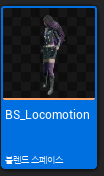
1. 블랜드 스페이스 만들기
섹션 5. 심플 슈터 글의 164번 항목을 참조했다.

2. 애니메이션 블루프린트 만들기
섹션 5. 심플 슈터 글의 165~166번 항목을 참조했다.
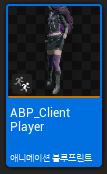
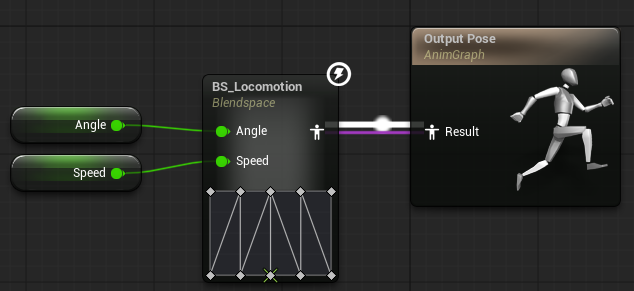
- ABP_ClientPlayer
애니메이션 블루프린트 이벤트 그래프에서 아래와 같이 구성해줬다.
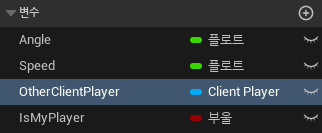
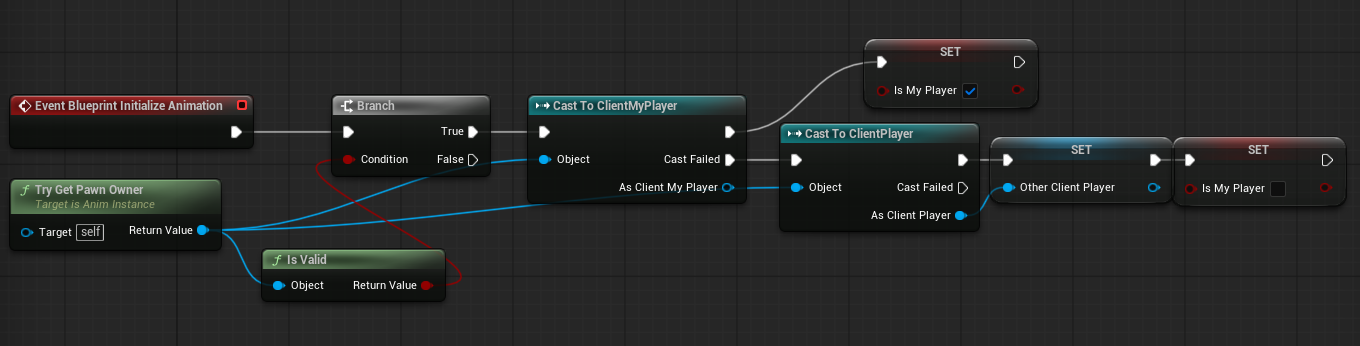
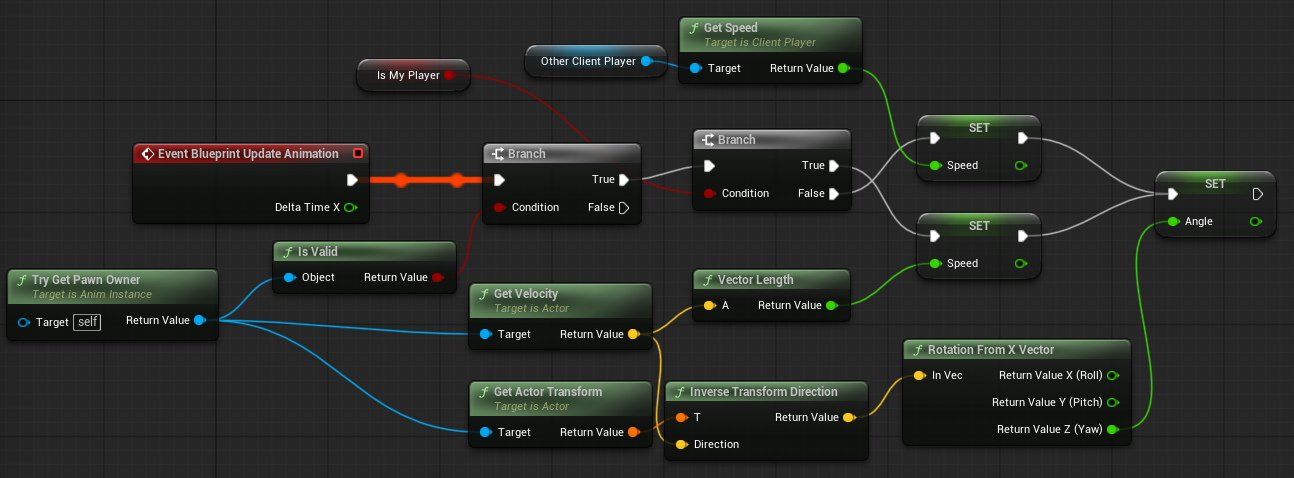
내 캐릭터는 클라이언트상의 이동속도를 기반으로 애니메이션을 출력시키고
화면상에 보이는 다른 유저 (MovePacket으로 이동하는 유저)는 ClientPlayer 객체에서 speed 값을 가져와서 애님메이션으 출력한다. (일단 이렇게 만들어봤는데 나중에 고쳐야 할 수도 있다.)
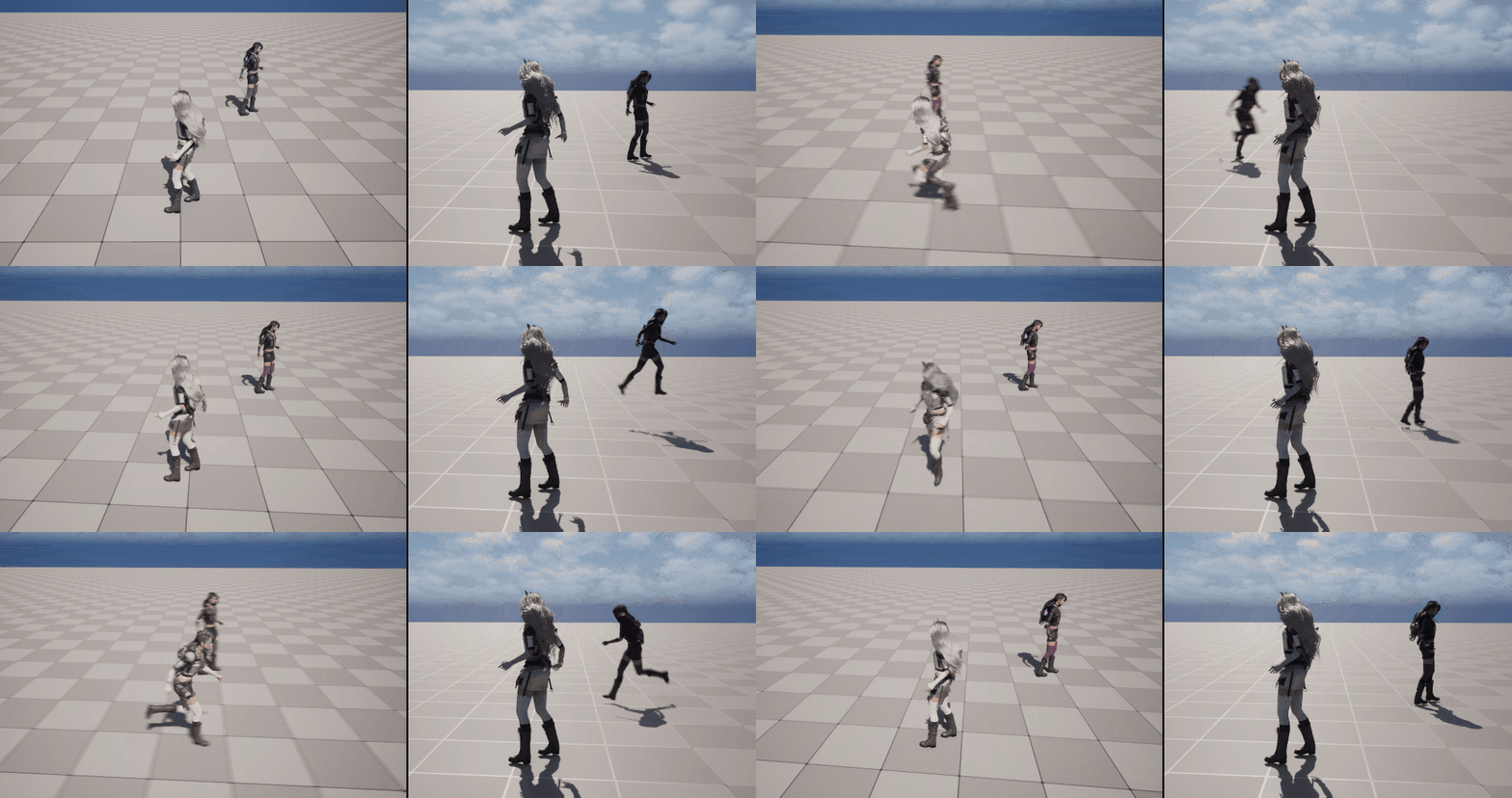
왼쪽이 컨트롤중인 클라이언트. 오른쪽은 다른 클라이언트에서 보는 시점이다.
완벽하지는 않지만 어느정도 봐줄만한 수준까지 올라왔다.
현재까지의 git 버전
서버
Feat: 이동 동기화 · Dodontak/Project_Island_GameServer@3960bf4
플레이어의 이동을 다른 플레이어의 클라이언트에서도 동기화 되도록 만듦.
github.com
클라이언트
Feat: 이동 동기화 · Dodontak/Project_Island_Client@5b4caf1
다른 유저의 이동을 동기화시킴. 이동 애니메이션 구현
github.com
'프로젝트 > Project_Island' 카테고리의 다른 글
| 57. RecastNavigation 라이브러리 설치하기 (0) | 2026.06.04 |
|---|---|
| 56. 몬스터 소환 및 이동 동기화 (0) | 2026.05.27 |
| 54. 스폰, 디스폰 (0) | 2026.05.18 |
| 53. 캐릭터 선택, 생성 (0) | 2026.05.12 |
| 52. 회원가입과 로그인 (0) | 2026.05.08 |