지난번에는 접속과 퇴장을 관리해봤다.
입장은 언리얼 에디터에서 ▶ 를 누르면 여러 클라이언트를 동시에 실행시키고 서버와 접속해 플레이어를 소환시킨다. 그리고 각각의 클라이언트가 보는 화면에 서로 다른 클라의 플레이어들을 띄워주기 위해 서버에서 브로드캐스트 함수를 사용해 각 playerinfo 를 spawn 패킷으로 전달해 해당하는 위치에 오브젝트가 뜨도록 했다.
그리고 퇴장은 q를 누르면 퇴장하는 함수가 실행돼서 서버에 퇴장요청을 보내고, 서버에서 퇴장이 성공했음을 당사자와 같은 방에 접속중인 모두에게 알리는 식으로 구현했다.
이번 목표는 이동을 구현하는 것이다.
17. Player, MyPlayer
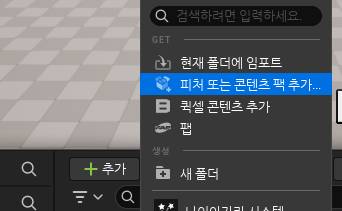
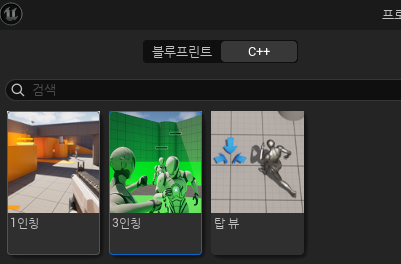
그런데 에러가 발생했다. 강의자도 발생했는데, 구체적인 내용은 다르다. (다른건 언리얼 버전 차이 때문인듯)
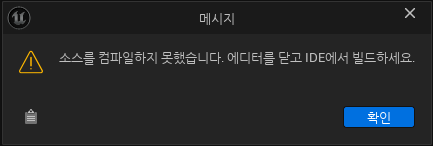
에디터를 닫고 빌드해보니 이런 에러가 떴다.
0>CombatAIController.h(21): Error  : Unable to find 'class', 'delegate', 'enum', or 'struct' with name 'UStateTreeAIComponent'
0>SideScrollingAIController.h(21): Error  : Unable to find 'class', 'delegate', 'enum', or 'struct' with name 'UStateTreeAIComponent'
클로드 AI에게 물어봐서 해결했다. 해결이 상당히 복잡해서 AI의 도움이 없었다면 해결하기 힘들었을 것 같다.
언리얼 프로젝트에 콘텐츠 추가 에러 해결
게임 서버 강의를 듣던 도중발생한 에러를 해결한 과정을 남기는 글. 지극히 개인적 경험.철저하게 클로드 AI에게 도움을 받아 해결했다. 게임서버(2) - 4 이동 동기화를 듣다가 에러가 발생했다.
dodontak.tistory.com
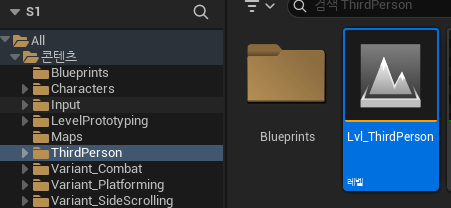

새로 생긴 ThirdPerson 폴더에 맵을 열어보면 익숙한 디폴트 맵을 볼 수 있다.
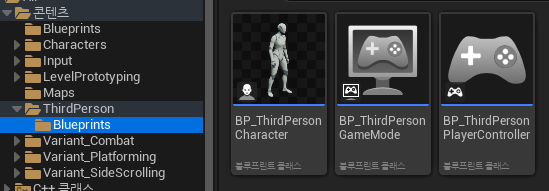
블루프린트에 보면 캐릭터가 있는데, 이걸 사용해보려 한다.
ThirdPerson/Input/Action에 IA_ Jump, Look, Move 파일이 있는데 이걸 블루프린트로 옮겨둔다.
나는 좀 다른데, Input폴더가 ThirdPerson 안에 있는게 아니라 밖에 있다(컨텐츠 폴더안에). 그래서 그냥 뒀다.

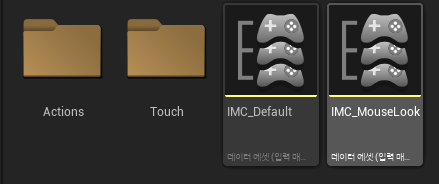
세개의 블루프린트는 혹시 모르니 내 블루프린트로 옮겨놓고, 맵과 빈블루프린트 폴더는 삭제해준다.
근데 어차피 c++파일을 보면 ThirdPerson 관련 파일들도 생겼는데 안쓸꺼고 우리만의 버전을 만들어 쓸거라 한다.
우리만의 캐릭터 클래스를 만들자.

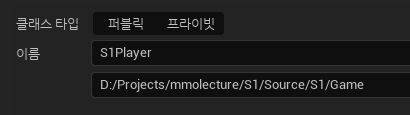
캐릭터를 상속받아서 S1Player를 만든다. 위치는 S1/Game
그리고 c++에 Game 폴더를 추가했으니 build.cs에서 추가해주자.
PrivateIncludePaths.AddRange(new string[]
{
    "S1/",
    "S1/Network/",
    "S1/Game/"
});
TP_ThirdPersonCharacter.h 에서 코드를 복붙해온다. 어차피 다 해본 이동, 시선이동 이런것들이다
헤더와 cpp 모두 전부 복붙한 다음 이름만 바꿔줬다.
S1Player.h
// Fill out your copyright notice in the Description page of Project Settings.

#pragma once

#include "CoreMinimal.h"
#include "GameFramework/Character.h"
#include "Logging/LogMacros.h"
#include "S1Player.generated.h"

class USpringArmComponent;
class UCameraComponent;
class UInputAction;
struct FInputActionValue;

UCLASS()
class S1_API AS1Player : public ACharacter
{
	GENERATED_BODY()

	/** Camera boom positioning the camera behind the character */
	UPROPERTY(VisibleAnywhere, BlueprintReadOnly, Category="Components", meta = (AllowPrivateAccess = "true"))
	USpringArmComponent* CameraBoom;

	/** Follow camera */
	UPROPERTY(VisibleAnywhere, BlueprintReadOnly, Category="Components", meta = (AllowPrivateAccess = "true"))
	UCameraComponent* FollowCamera;

protected:

	/** Jump Input Action */
	UPROPERTY(EditAnywhere, Category="Input")
	UInputAction* JumpAction;

	/** Move Input Action */
	UPROPERTY(EditAnywhere, Category="Input")
	UInputAction* MoveAction;

	/** Look Input Action */
	UPROPERTY(EditAnywhere, Category="Input")
	UInputAction* LookAction;

	/** Mouse Look Input Action */
	UPROPERTY(EditAnywhere, Category="Input")
	UInputAction* MouseLookAction;

public:

	/** Constructor */
	AS1Player();

protected:

	/** Initialize input action bindings */
	virtual void SetupPlayerInputComponent(class UInputComponent* PlayerInputComponent) override;

protected:

	/** Called for movement input */
	void Move(const FInputActionValue& Value);

	/** Called for looking input */
	void Look(const FInputActionValue& Value);

public:

	/** Handles move inputs from either controls or UI interfaces */
	UFUNCTION(BlueprintCallable, Category="Input")
	virtual void DoMove(float Right, float Forward);

	/** Handles look inputs from either controls or UI interfaces */
	UFUNCTION(BlueprintCallable, Category="Input")
	virtual void DoLook(float Yaw, float Pitch);

	/** Handles jump pressed inputs from either controls or UI interfaces */
	UFUNCTION(BlueprintCallable, Category="Input")
	virtual void DoJumpStart();

	/** Handles jump pressed inputs from either controls or UI interfaces */
	UFUNCTION(BlueprintCallable, Category="Input")
	virtual void DoJumpEnd();

public:

	/** Returns CameraBoom subobject **/
	FORCEINLINE class USpringArmComponent* GetCameraBoom() const { return CameraBoom; }

	/** Returns FollowCamera subobject **/
	FORCEINLINE class UCameraComponent* GetFollowCamera() const { return FollowCamera; }
};
S1Player.cpp
// Copyright Epic Games, Inc. All Rights Reserved.

#include "S1Player.h"
#include "Engine/LocalPlayer.h"
#include "Camera/CameraComponent.h"
#include "Components/CapsuleComponent.h"
#include "GameFramework/CharacterMovementComponent.h"
#include "GameFramework/SpringArmComponent.h"
#include "GameFramework/Controller.h"
#include "EnhancedInputComponent.h"
#include "EnhancedInputSubsystems.h"
#include "InputActionValue.h"
#include "S1.h"

AS1Player::AS1Player()
{
	// Set size for collision capsule
	GetCapsuleComponent()->InitCapsuleSize(42.f, 96.0f);

	// Don't rotate when the controller rotates. Let that just affect the camera.
	bUseControllerRotationPitch = false;
	bUseControllerRotationYaw = false;
	bUseControllerRotationRoll = false;

	// Configure character movement
	GetCharacterMovement()->bOrientRotationToMovement = true;
	GetCharacterMovement()->RotationRate = FRotator(0.0f, 500.0f, 0.0f);

	// Note: For faster iteration times these variables, and many more, can be tweaked in the Character Blueprint
	// instead of recompiling to adjust them
	GetCharacterMovement()->JumpZVelocity = 500.f;
	GetCharacterMovement()->AirControl = 0.35f;
	GetCharacterMovement()->MaxWalkSpeed = 500.f;
	GetCharacterMovement()->MinAnalogWalkSpeed = 20.f;
	GetCharacterMovement()->BrakingDecelerationWalking = 2000.f;
	GetCharacterMovement()->BrakingDecelerationFalling = 1500.0f;

	// Create a camera boom (pulls in towards the player if there is a collision)
	CameraBoom = CreateDefaultSubobject<USpringArmComponent>(TEXT("CameraBoom"));
	CameraBoom->SetupAttachment(RootComponent);
	CameraBoom->TargetArmLength = 400.0f;
	CameraBoom->bUsePawnControlRotation = true;

	// Create a follow camera
	FollowCamera = CreateDefaultSubobject<UCameraComponent>(TEXT("FollowCamera"));
	FollowCamera->SetupAttachment(CameraBoom, USpringArmComponent::SocketName);
	FollowCamera->bUsePawnControlRotation = false;

	// Note: The skeletal mesh and anim blueprint references on the Mesh component (inherited from Character)
	// are set in the derived blueprint asset named ThirdPersonCharacter (to avoid direct content references in C++)
}

void AS1Player::SetupPlayerInputComponent(UInputComponent* PlayerInputComponent)
{
	// Set up action bindings
	if (UEnhancedInputComponent* EnhancedInputComponent = Cast<UEnhancedInputComponent>(PlayerInputComponent)) {

		// Jumping
		EnhancedInputComponent->BindAction(JumpAction, ETriggerEvent::Started, this, &ACharacter::Jump);
		EnhancedInputComponent->BindAction(JumpAction, ETriggerEvent::Completed, this, &ACharacter::StopJumping);

		// Moving
		EnhancedInputComponent->BindAction(MoveAction, ETriggerEvent::Triggered, this, &AS1Player::Move);
		EnhancedInputComponent->BindAction(MouseLookAction, ETriggerEvent::Triggered, this, &AS1Player::Look);

		// Looking
		EnhancedInputComponent->BindAction(LookAction, ETriggerEvent::Triggered, this, &AS1Player::Look);
	}
	else
	{
		UE_LOG(LogTemp, Error, TEXT("'%s' Failed to find an Enhanced Input component! This template is built to use the Enhanced Input system. If you intend to use the legacy system, then you will need to update this C++ file."), *GetNameSafe(this));
	}
}

void AS1Player::Move(const FInputActionValue& Value)
{
	// input is a Vector2D
	FVector2D MovementVector = Value.Get<FVector2D>();

	// route the input
	DoMove(MovementVector.X, MovementVector.Y);
}

void AS1Player::Look(const FInputActionValue& Value)
{
	// input is a Vector2D
	FVector2D LookAxisVector = Value.Get<FVector2D>();

	// route the input
	DoLook(LookAxisVector.X, LookAxisVector.Y);
}

void AS1Player::DoMove(float Right, float Forward)
{
	if (GetController() != nullptr)
	{
		// find out which way is forward
		const FRotator Rotation = GetController()->GetControlRotation();
		const FRotator YawRotation(0, Rotation.Yaw, 0);

		// get forward vector
		const FVector ForwardDirection = FRotationMatrix(YawRotation).GetUnitAxis(EAxis::X);

		// get right vector
		const FVector RightDirection = FRotationMatrix(YawRotation).GetUnitAxis(EAxis::Y);

		// add movement
		AddMovementInput(ForwardDirection, Forward);
		AddMovementInput(RightDirection, Right);
	}
}

void AS1Player::DoLook(float Yaw, float Pitch)
{
	if (GetController() != nullptr)
	{
		// add yaw and pitch input to controller
		AddControllerYawInput(Yaw);
		AddControllerPitchInput(Pitch);
	}
}

void AS1Player::DoJumpStart()
{
	// signal the character to jump
	Jump();
}

void AS1Player::DoJumpEnd()
{
	// signal the character to stop jumping
	StopJumping();
}
자 그럼 먼저 생각을 해보자.
일단 한가지 중요한건 캐릭터를 내가 컨트롤하는지, 남이 컨트롤 하는 구분할 수 있어야한다.
어떻게 할까?
패킷이 들어올 때 entergame과 spawn으로 나눠놨으니 나와 다른캐릭터는 구분할 수 있다.
근데 그러면 플레이어 자체를 같은 파일 기반으로 만들어 썼다 하면 언리얼은 빙의된 캐릭터가 하나이니 그걸로 구분이 될것이다. 그런데 이렇게 관리하는건 비추인게, 액션, 카메라 붐, 팔로우 카메라 이런 캐릭터 파일에 있는 기능들이 남이 관리하는 캐릭터에도 붙어있을 필요는 없기 때문.
근데 어찌됐든 캐릭터에 대해 공용 부분이 있고, 그중에 내 캐릭터에만 특수한 기능들이 붙어있는 거니까, 상속을 사용해서 새 클래스를 만든다. 이름은 S1MyPlayer
이런 설계적인 부분들을 고민을 많이 해야한다고 한다.
이제 공통적인 부분만 S1Player에 남기고, 내 플레이어에만 해당하는 기능을 S1MyPlayer로 이전한다.
근데 보니 전부 옮겨야한다. 아까 했던 작업을 똑같이 S1MyPlayer에 해준다.
그리고 기존의 S1Player에서 필요없는 기능은 제거한다. (생성자 빼고 전부 제거됐고 생성자의 내용물 중 카메라 관련도 제거했다.)
UCLASS()
class S1_API AS1Player : public ACharacter
{
	GENERATED_BODY()

public:
	/** Constructor */
	AS1Player();
};

AS1Player::AS1Player()
{
	// Set size for collision capsule
	GetCapsuleComponent()->InitCapsuleSize(42.f, 96.0f);

	// Don't rotate when the controller rotates. Let that just affect the camera.
	bUseControllerRotationPitch = false;
	bUseControllerRotationYaw = false;
	bUseControllerRotationRoll = false;

	// Configure character movement
	GetCharacterMovement()->bOrientRotationToMovement = true;
	GetCharacterMovement()->RotationRate = FRotator(0.0f, 500.0f, 0.0f);

	// Note: For faster iteration times these variables, and many more, can be tweaked in the Character Blueprint
	// instead of recompiling to adjust them
	GetCharacterMovement()->JumpZVelocity = 500.f;
	GetCharacterMovement()->AirControl = 0.35f;
	GetCharacterMovement()->MaxWalkSpeed = 500.f;
	GetCharacterMovement()->MinAnalogWalkSpeed = 20.f;
	GetCharacterMovement()->BrakingDecelerationWalking = 2000.f;
	GetCharacterMovement()->BrakingDecelerationFalling = 1500.0f;

	// Note: The skeletal mesh and anim blueprint references on the Mesh component (inherited from Character)
	// are set in the derived blueprint asset named ThirdPersonCharacter (to avoid direct content references in C++)
}
AMyPlayer는 부모의 생성자에서 위의 처리를 해줬으니 저 부분은 지우고 카메라 부분만 남긴다.
AS1MyPlayer::AS1MyPlayer()
{
	// Create a camera boom (pulls in towards the player if there is a collision)
	CameraBoom = CreateDefaultSubobject<USpringArmComponent>(TEXT("CameraBoom"));
	CameraBoom->SetupAttachment(RootComponent);
	CameraBoom->TargetArmLength = 400.0f;
	CameraBoom->bUsePawnControlRotation = true;

	// Create a follow camera
	FollowCamera = CreateDefaultSubobject<UCameraComponent>(TEXT("FollowCamera"));
	FollowCamera->SetupAttachment(CameraBoom, USpringArmComponent::SocketName);
	FollowCamera->bUsePawnControlRotation = false;

	// Note: The skeletal mesh and anim blueprint references on the Mesh component (inherited from Character)
	// are set in the derived blueprint asset named ThirdPersonCharacter (to avoid direct content references in C++)
}
이제 이런저런 파일들을 정리하자.
이제 ThirdPerson 필요없으니 제거하자. 소스코드에 있던 ThirdPerson 폴더 전체 삭제, 이거 추가면서 생긴 에러 해결한다고 추가했던 build.cs 빌드옵션, 플러그인 추가한 부분 되돌림.
이전에 테스트로 쓰던 MyActor도 삭제. 아까 혹시몰라 남겨둔 블루프린트 세개도 삭제.
ThirdPerson 설치하면서 같이 설치된 콘텐츠 파일들도 캐릭터와 인풋 빼고 전부 삭제.
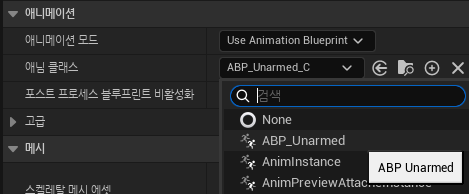
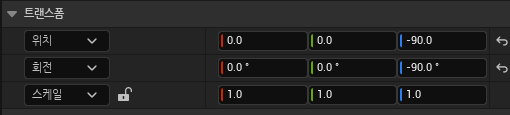
이제 아까 만든 클래스로 블루프린트를 각각 만들어주자.
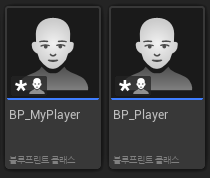
각각 스켈레탈 매시, 애니메이션, 위치와 방향 설정정도 해주자.
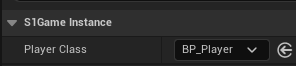
그리고 게임 인스턴스에서도 PlayerClass를 BP_Player로 변경한다.

gamemodebase로 BP_GameMode도 만든다. 월드 세팅에서 게임모드 설정하고, 디폴트 폰클래스를 myplayer로 설정한다.
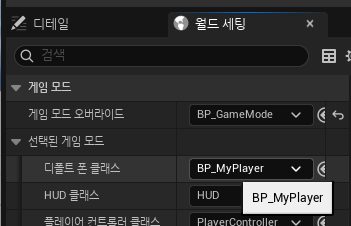
이전에는 내 캐릭터든 다른사람이든 소환시키는 방식이었는데 내 캐릭터는 게임모드의 디폴트 폰 클래스를 쓰고
다른사람을 소환하도록 변경됐다.
UCLASS()
class S1_API US1GameInstance : public UGameInstance
{
	GENERATED_BODY()
    /*...*/
public:
	UPROPERTY(EditAnywhere)
	TSubclassOf<AS1Player> OtherPlayerClass;

	AS1Player* MyPlayer;
	TMap<uint64, AS1Player*> Players;
/*...*/
};

void US1GameInstance::HandleSpawn(const Protocol::PlayerInfo& PlayerInfo, bool IsMine)
{
	if (Socket == nullptr || GameServerSession == nullptr)
		return;
	auto* World = GetWorld();
	if (World == nullptr)
		return;
	const uint64 ObjectId = PlayerInfo.object_id();
	if (Players.Find(ObjectId) != nullptr)
		return;

	FVector SpawnLocation(PlayerInfo.x(), PlayerInfo.y(), PlayerInfo.z());

	if (IsMine)
	{
		auto* PC = UGameplayStatics::GetPlayerController(this, 0);
		AS1Player* Player = Cast<AS1Player>(PC->GetPawn());
		if (Player == nullptr)
			return;
		MyPlayer = Player;
		Players.Add(PlayerInfo.object_id(), Player);
	}
	else
	{
		AS1Player* Player = Cast<AS1Player>(World->SpawnActor(OtherPlayerClass, &SpawnLocation));

		Players.Add(PlayerInfo.object_id(), Player);
	}
}

void US1GameInstance::HandleSpawn(const Protocol::S_ENTER_GAME& EnterGamePkt)
{
	HandleSpawn(EnterGamePkt.player(), true);
}

void US1GameInstance::HandleSpawn(const Protocol::S_SPAWN& SpawnPkt)
{
	for (auto& Player : SpawnPkt.players())
	{
		HandleSpawn(Player, false);
	}
}

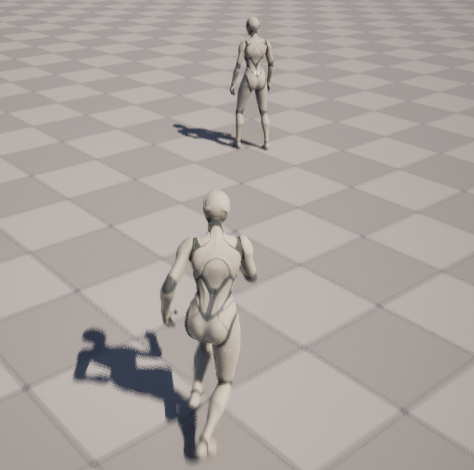
클라이언트를 2로 설정하고 켜보면 두명이 잘 보이고, 각각 다른 블루프린트로 만들어진것도 확인할 수 있다.
지금은 내 플레이어가 안움직이는데, 인풋 설정을 안해서 그렇다.
S1MyPlayer.h에서 이렇게 추가하고,
UCLASS()
class S1_API AS1MyPlayer : public AS1Player
{

	GENERATED_BODY()
/*...*/
protected:
	virtual void BeginPlay() override;

	UPROPERTY(EditAnywhere, Category="Input")
	class UInputMappingContext* DefaultMappingContext;

	UPROPERTY(EditAnywhere, Category="Input")
	class UInputMappingContext* MouseLookMappingContext;
/*...*/
};

void AS1MyPlayer::BeginPlay()
{
	Super::BeginPlay();

	if (APlayerController* PlayerController = Cast<APlayerController>(GetController()))
	{
		if (UEnhancedInputLocalPlayerSubsystem* Subsystem = ULocalPlayer::GetSubsystem<UEnhancedInputLocalPlayerSubsystem>(PlayerController->GetLocalPlayer()))
		{
			Subsystem->AddMappingContext(DefaultMappingContext, 0);
			Subsystem->AddMappingContext(MouseLookMappingContext, 0);
		}
	}
}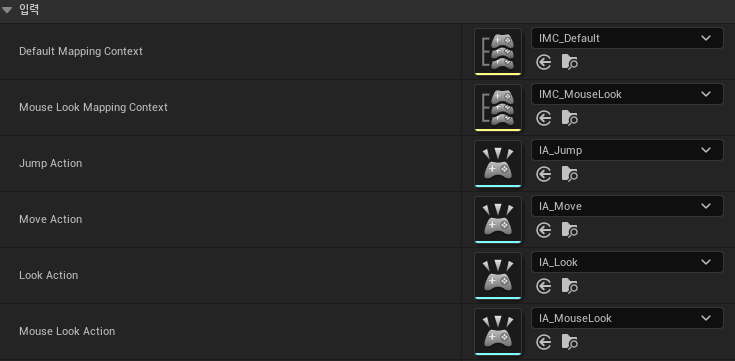
그리고 빌드를 하고, MyPlayer 블루프린트에서 입력을 위와 같이 설정해준다.
각 파일들은 아까 ThirdPerson을 받을 때 설치된 Input폴더의 파일들이다.
이제 적어도 내 클라이언트에서는 내 캐릭터가 잘 움직인다!
18. 이동
이동을 구현해보자.
클라의 움직임을 적용시키는 방법은 크게 두가지가 있다.
1. 클라이언트가 먼저 움직이고 서버에 알리면 서버가 브로드캐스트 하는 방식
2. 클라이언트가 서버에게 이동을 요청하면 서버가 그걸 허락하는 방식
왜 두가지 방법이 다 쓰일까? 다양한 이유가 있다.
키보드 이동은 주로 1번 방식을 쓴다. like FPS -> 반응 빠름 단 유효성 검사 필요.
마우스 이동은 주로 2번 방식을 쓴다. like 롤 -> 반응 느림
유닛끼리 충돌이 없다 - 1번 방식
유닛끼리 충돌이 있다 - 2번 방식
요청/허락 방식은 패킷이 끊기면 위치를 롤백시키기도 한다.
우리는 1번 방식으로 만들어보자. 키보드로 움직이니까.
지금은 입장, 퇴장, 스폰, 디스폰 패킷만 있다. 이동패킷 만들어주자.
message C_MOVE
{
	PlayerInfo player = 1;
}

message S_MOVE
{
	PlayerInfo player = 1;
}
MOVE message에 Playerinfo만 넣어서 쓰자. 그게 편하니까. 관리도 쉽고.
proto파일을 바꿨으니 패킷 핸들러에서도 함수 추가해놓자.
이제 차례대로 구현을 시작해보자.
클라에서 먼저 이동패킷을 보내야하니
CMove는 누가 보내면 좋을까? 내가 컨트롤하는건 MyPlayer니까 MyPlayer에 만들어주자.
그럼 언제 보내면 좋을까? 이동한다는 사실을 언제 전달할까?
tick함수에서 하자. 지금 아예 없으니까 만들어주자.
class S1_API AS1MyPlayer : public AS1Player
{

	GENERATED_BODY()
protected:
	virtual void BeginPlay() override;
	virtual void Tick(float DeltaTime) override;
    /*...*/
}
그런데 매 프레임마다 패킷을 보내는건 말도 안된다. 요즘은 거의 초당 200회씩 보내게 될테니까.
게임마다 다르지만 rpg는 대략 0.2초마다 한번씩 보낸다고 한다.
일단 무식한 방법으로 만들어보자
무브패킷샌드딜레이를 0.2초로 설정헤서
틱 함수 안에서 타이머가 딜레이 넘어갔으면 서버로 C_MOVE 패킷 보내기.
현재 위치 정보를 보내도록 만들어보자.
Player들 위치정보 저장, setter, getter 만들기
class S1_API AS1Player : public ACharacter
{
	GENERATED_BODY()

public:
	/** Constructor */
	AS1Player();
	virtual ~AS1Player();
public:
	void SetPlayerInfo(const Protocol::PlayerInfo& Info);
	Protocol::PlayerInfo* GetPlayerInfo() { return PlayerInfo;}
protected:
	Protocol::PlayerInfo* PlayerInfo; // 현재 위치
};

AS1Player::AS1Player()
{
	/*...*/
	PlayerInfo = new Protocol::PlayerInfo();
}

AS1Player::~AS1Player()
{
	delete PlayerInfo;
	PlayerInfo = nullptr;
}

void AS1Player::SetPlayerInfo(const Protocol::PlayerInfo& Info)
{
	PlayerInfo->CopyFrom(Info);
	FVector Location(Info.x(), Info.y(), Info.z());
	SetActorLocation(Location);
}
AS1Player Tick 함수에서 PlayerInfo를 계속 업데이트 해준다. (MyPlayer tick에 있어야 되는거 아닌가? 일단 그냥 두자.)
void AS1Player::BeginPlay()
{
	Super::BeginPlay();
}

void AS1Player::Tick(float DeltaTime)
{
	Super::Tick(DeltaTime);

	{
		FVector Location = GetActorLocation();

		PlayerInfo->set_x(Location.X);
		PlayerInfo->set_y(Location.Y);
		PlayerInfo->set_z(Location.Z);
		PlayerInfo->set_yaw(GetControlRotation().Yaw);
	}
}
MyPlayer Tick함수
void AS1MyPlayer::Tick(float DeltaTime)
{
	Super::Tick(DeltaTime);

	MovePacketSendTimer -= DeltaTime;

	if (MovePacketSendTimer <= 0)
	{
		MovePacketSendTimer = MOVE_PACKET_SEND_DELAY;

		Protocol::C_MOVE MovePkt;

		//현재 위치 정보
		{
			Protocol::PlayerInfo* Info = MovePkt.mutable_playerinfo();
			Info->CopyFrom(*PlayerInfo);
		}

		SEND_PACKET(MovePkt);
	}
}
0.2초마다 객체의 PlayerInfo를 MovePkt에 담아서 보내준다.
C_MOVE패킷을 서버로 보냈으니 이제 서버측에서 처리해주자.
서버에서 Handle_C_MOVE처리
Room.HandleMoveLocked함수 만들기
bool Room::HandleMoveLocked(Protocol::C_MOVE& pkt)
{
    WRITE_LOCK;
    const uint64 objectId = pkt.info().object_id();
    PlayerRef player = _players[objectId];
    player->playerInfo->CopyFrom(pkt.info());
    {
        Protocol::S_MOVE movePkt;
        {
            Protocol::PlayerInfo* info = movePkt.mutable_info();
            info->CopyFrom(pkt.info());
        }
        SendBufferRef sendBuffer = ServerPacketHandler::MakeSendBuffer(movePkt);
        Broadcast(sendBuffer, objectId);
    }
}
bool Handle_S_MOVE(PacketSessionRef& session, Protocol::S_MOVE& pkt)
{
	if (auto* GameInstance = Cast<US1GameInstance>(GWorld->GetGameInstance()))
	{
		GameInstance->HandleMove(pkt);
	}
	return true;
}
게임인스턴스의 HandleMove에서 서버로부터 받은 다른 유저들의 위치를 업데이트한다.
IsMyPlayer는 패킷이 내 움직임을 전달해온거면, 그건 나의 과거 위치 데이터일테니 무시하도록 하기 위해 만들어졌다.
언리얼 Cast 함수로 다이나믹 캐스팅으로 확인함.
void US1GameInstance::HandleMove(const Protocol::S_MOVE& MovePkt)
{
	if (Socket == nullptr || GameServerSession == nullptr)
		return;

	auto* World = GetWorld();
	if (World == nullptr)
		return;

	const uint64 ObjectId = MovePkt.info().object_id();
	AS1Player** FindActor = Players.Find(ObjectId);
	if (FindActor == nullptr)
		return;

	AS1Player* Player = (*FindActor);
	if (Player->IsMyPlayer())
		return;

	const Protocol::PlayerInfo& Info = MovePkt.info();
	Player->SetPlayerInfo(Info);
}

bool AS1Player::IsMyPlayer()
{
	return Cast<AS1MyPlayer>(this) != nullptr;
}
그리고 PlayerInfo가 스폰될때 set되지 않는점이 있었는데 수정한다.
void US1GameInstance::HandleSpawn(const Protocol::PlayerInfo& PlayerInfo, bool IsMine)
{
    if (Socket == nullptr || GameServerSession == nullptr)
       return;
    auto* World = GetWorld();
    if (World == nullptr)
       return;
    const uint64 ObjectId = PlayerInfo.object_id();
    if (Players.Find(ObjectId) != nullptr)
       return;

    FVector SpawnLocation(PlayerInfo.x(), PlayerInfo.y(), PlayerInfo.z());

    if (IsMine)
    {
       auto* PC = UGameplayStatics::GetPlayerController(this, 0);
       AS1Player* Player = Cast<AS1Player>(PC->GetPawn());
       if (Player == nullptr)
          return;

       Player->SetPlayerInfo(PlayerInfo);// 이 부분 추가됨

       MyPlayer = Player;
       Players.Add(PlayerInfo.object_id(), Player);
    }
    else
    {
       AS1Player* Player = Cast<AS1Player>(World->SpawnActor(OtherPlayerClass, &SpawnLocation));

       Player->SetPlayerInfo(PlayerInfo);// 이 부분 추가됨
       Players.Add(PlayerInfo.object_id(), Player);
    }
}
다른 캐릭터의 이동이 보인다. 그런데 애니메이션이 없다. 근데 이건 의도대로니까 ok다.
19. 보정처리
0.2초마다 툭툭 끊기는 문제를 어떻게 해결할까?
단순하게 생각하면 패킷 보내는 간격을 더 짧게 하면 되지 않을까? 싶은데 너무 패킷을 자주 보내면 네트워크에 너무 부하를 줘서 안된다. 그래서 어떤식으로건 보정하는 방법을 써야한다.
목표 지점을 정해주고 스르륵 이동하게.
클라 player 에 DestInfo 추가. 이게 의미하는건 아직 이동하지 않았지만 여기로 이동하려 한다. 라는 뜻.
UCLASS()
class S1_API AS1Player : public ACharacter
{
/*...*/
protected:
	Protocol::PlayerInfo* PlayerInfo; // 현재 위치
	Protocol::PlayerInfo* DestInfo; // 목적지
};

AS1Player::AS1Player()
{
	/*...*/
	PlayerInfo = new Protocol::PlayerInfo();
	DestInfo = new Protocol::PlayerInfo();
}

AS1Player::~AS1Player()
{
	delete PlayerInfo;
	delete DestInfo;
	PlayerInfo = nullptr;
	DestInfo = nullptr;
}
그리고 SetDestInfo 함수를 만든다.
SetPlayerInfo에서는 언리얼의 SetActorLocation 함수로 위치를 즉시 수정해줬지만, 이건 그냥 DestInfo를 업데이트하는 함수다.
위치 수정은 tick함수에서 언리얼에서 제공하는 기능으로 스무스하게 이동하게 변경하자.
UCLASS()
class S1_API AS1Player : public ACharacter
{
	/*...*/
	void SetPlayerInfo(const Protocol::PlayerInfo& Info);
	void SetDestInfo(const Protocol::PlayerInfo& Info);
	/*...*/
};

void AS1Player::SetDestInfo(const Protocol::PlayerInfo& Info)
{
	if (PlayerInfo->object_id() != 0)
	{
		assert(PlayerInfo->object_id() == Info.object_id());
	}
	//Dest에 최종 상태 복사.
	DestInfo->CopyFrom(Info);

}

void AS1Player::BeginPlay()
{
	Super::BeginPlay();
	{
		FVector Location = GetActorLocation();
		DestInfo->set_x(Location.X);// 초기값 설정.
		DestInfo->set_y(Location.Y);
		DestInfo->set_z(Location.Z);
		DestInfo->set_yaw(GetControlRotation().Yaw);
	}
}
Player의 Tick함수
void AS1Player::Tick(float DeltaTime)
{
	Super::Tick(DeltaTime);

	{//언리얼 상의 위치 -> PlayerInfo로 전달하는데 개인적으로 여기있는게 맞나 싶음.
		FVector Location = GetActorLocation();

		PlayerInfo->set_x(Location.X);
		PlayerInfo->set_y(Location.Y);
		PlayerInfo->set_z(Location.Z);
		PlayerInfo->set_yaw(GetControlRotation().Yaw);
	}

	// 추가된 부분. 다른 플레이어만 신경쓰면 되니까 나는 제외함.
    // 매 틱마다 600의 속도로 현재 위치에서 dest로 이동하게 함.
	if (IsMyPlayer() == false)
	{
		FVector Location = GetActorLocation();
		FVector DestLocation = FVector(DestInfo->x(), DestInfo->y(), DestInfo->z());

		FVector MoveDir = (DestLocation - Location);
		const float DistToDest = MoveDir.Length();
		MoveDir.Normalize();

		float MoveDist = (MoveDir * 600.f * DeltaTime).Length();
		MoveDist = FMath::Min(MoveDist, DistToDest);
		FVector NewLocation = Location + MoveDir * MoveDist;

		SetActorLocation(NewLocation);
	}
}
이제 무브패킷을 받으면 SetPlayerInfo가 아니라 SetDestInfo를 호출하도록 변경한다.
void US1GameInstance::HandleMove(const Protocol::S_MOVE& MovePkt)
{
	/*...*/
	// Player->SetPlayerInfo(Info);
	Player->SetDestInfo(Info);
}
이제 빌드를 하고 언리얼에서 확인해보자.
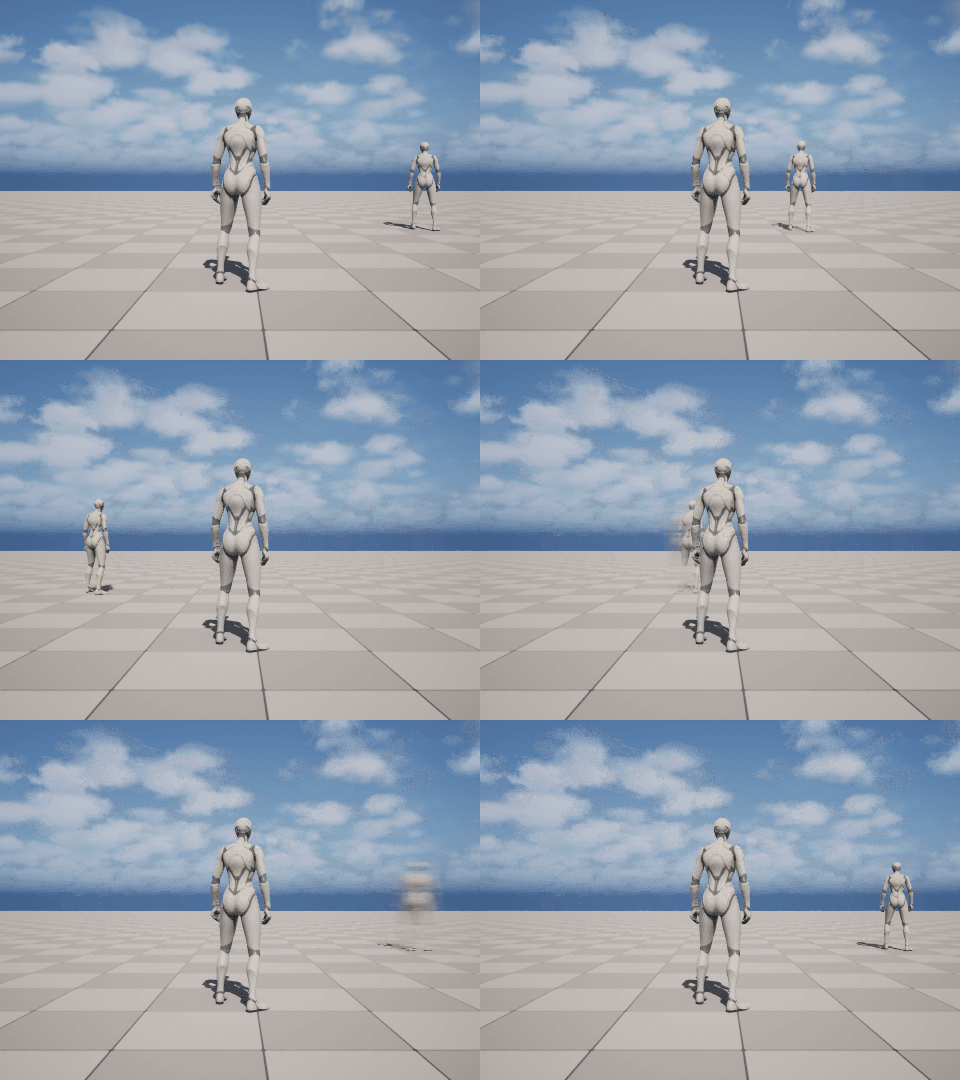
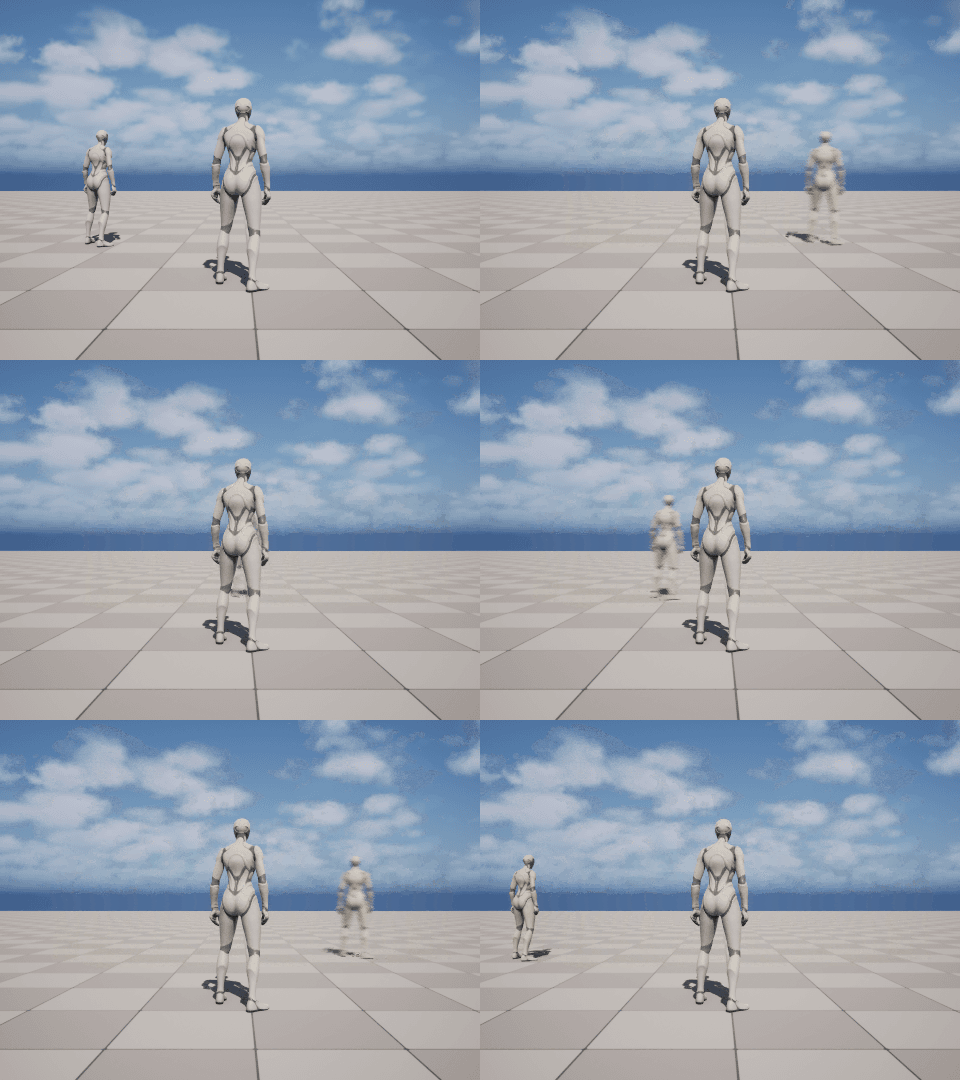
움직임의 부드러움이 확실히 차이난다.
나름 부드럽게 이동하지만, 이게 완벽하지 않은게 근사값을 가지고 스르륵 이동하기때문에 플레이어의 실제위치와 맞지 않는 문제가 발생할 수 있다.
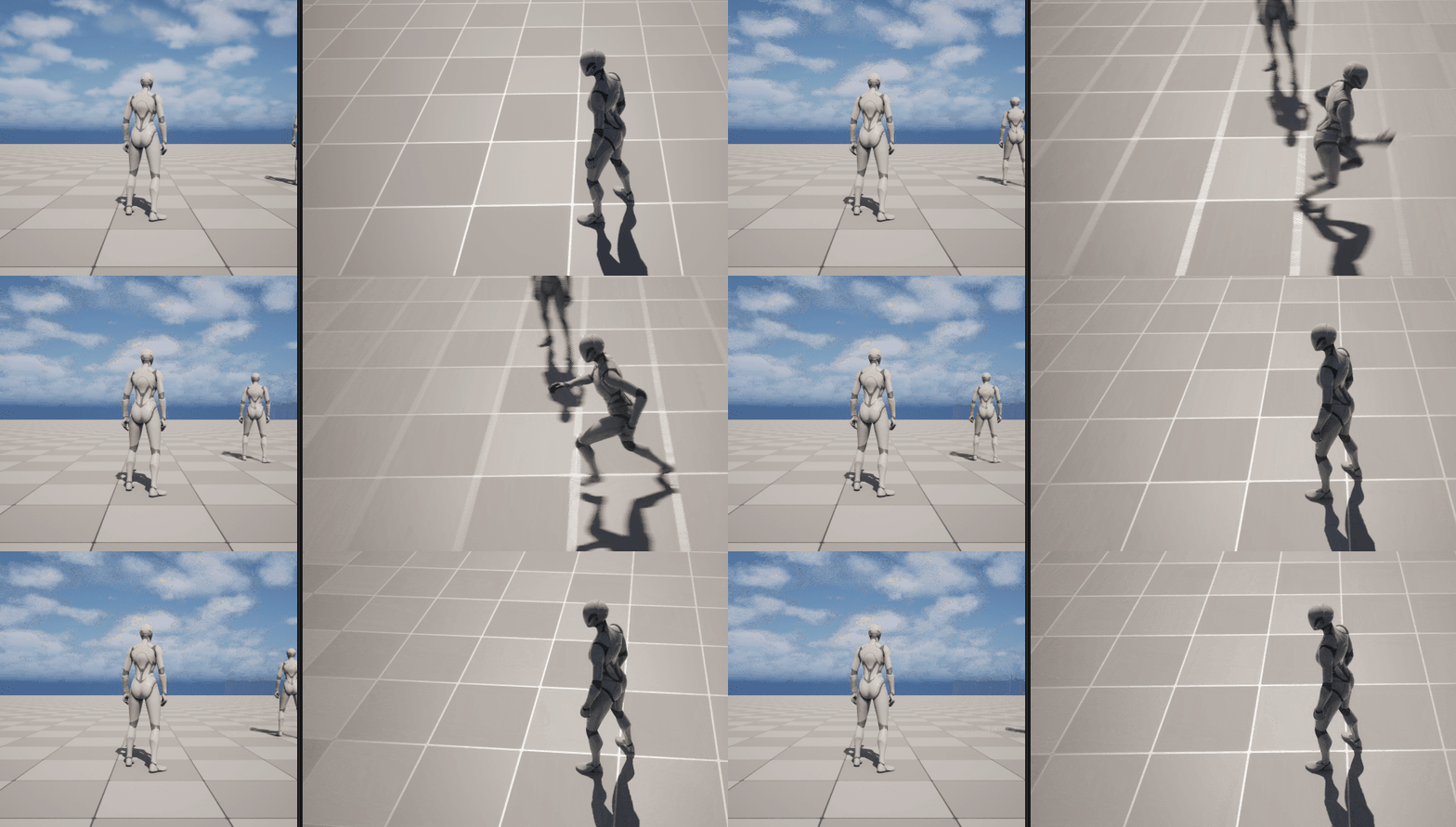
예시로 이동속도를 600에서 50으로 줄이고 테스트 해봤다. 이렇게 하자 실제 유저는 왼쪽 끝까지 갔다가 원래 위치로 돌아왔는데, 다른 유저가 볼땐 아주 조금만 움직인걸로 보인다. 지금은 극단적인 예시를 보여주기 위해 다른 플레이어의 이동속도를 50으로 낮춘거지만 플레이어가 600보다 빠른 속도로 움직인다면 조금 더 빠를 뿐 똑같은 현상이 일어날 것이다. (이건 당장 해결하는건 아닌듯)
다음으로 해볼건 보정값만 이용하는게 아니라 상태를 둬서 무조건 0.2초마다 처리하는게 아니라 경우에 따라 0.2초보다 더 앞당겨서 패킷을 처리하는 것이다. 예를들어 점프를 하면 점프했다 라는 상태를 다른 이들에게 즉시 알려야 할 것이다.
상태를 추가하기 위해 proto파일의 enum을 추가하자.
enum MoveState
{
	MOVE_STATE_NONE = 0;
	MOVE_STATE_IDLE = 1;
	MOVE_STATE_RUN = 2;
	MOVE_STATE_JUMP = 3;
}

message PlayerInfo
{
	uint64 object_id = 1;
	float x = 2;
	float y = 3;
	float z = 4;
	float yaw = 5;
	MoveState state= 6;
}
Get, Set MoveState 함수 추가.
UCLASS()
class S1_API AS1Player : public ACharacter
{
	/*...*/
public:
	bool IsMyPlayer();
    void SetMoveState(const Protocol::MoveState& State);
	Protocol::MoveState GetMoveState() { return PlayerInfo->state(); }
	/**/
};

void AS1Player::SetMoveState(const Protocol::MoveState& State)
{
	if (PlayerInfo->state() == State)
		return;
	PlayerInfo->set_state(State);
	// TODO
}
점프같은 동작 뿐 아니라 방향을 갑자기 튼다던가 하는 것도 0.2초 업데이트에 기댈게 아니라 즉시 패킷을 보내도록 하면 좋을것이다. 그런데 또 악랄한 유저가 좌 우 좌 우 움직이는 스팸을 날리면 패킷테러를 당할테니 그런걸 처리하는 수단도 갖춰야 할것이다. 그래서 실제 현장에서도 Tick 함수 안이 상당히 지저분했다고 강의자는 말한다. 예외처리 할게 많기 때문.
지금 움직임을 담당하는 함수를 보자. (ThirdPerson에서 그대로 가져온것들임)
void AS1MyPlayer::Move(const FInputActionValue& Value)
{
	// input is a Vector2D
	FVector2D MovementVector = Value.Get<FVector2D>();

	// route the input
	DoMove(MovementVector.X, MovementVector.Y);
}

void AS1MyPlayer::DoMove(float Right, float Forward)
{
	if (GetController() != nullptr)
	{
		// find out which way is forward
		const FRotator Rotation = GetController()->GetControlRotation();
		const FRotator YawRotation(0, Rotation.Yaw, 0);

		// get forward vector
		const FVector ForwardDirection = FRotationMatrix(YawRotation).GetUnitAxis(EAxis::X);

		// get right vector
		const FVector RightDirection = FRotationMatrix(YawRotation).GetUnitAxis(EAxis::Y);

		// add movement
		AddMovementInput(ForwardDirection, Forward);
		AddMovementInput(RightDirection, Right);
	}
}
cache를 추가한다. 어디선가 쓴다고 한다.
UCLASS()
class S1_API AS1MyPlayer : public AS1Player
{
	/*...*/
protected:
	const float MOVE_PACKET_SEND_DELAY = 0.2f;
	float MovePacketSendTimer = MOVE_PACKET_SEND_DELAY;

	//Cache 추가한 부분
	FVector2D DesiredInput;
	FVector DesiredMoveDirection;
	float DesiredYaw;
};

void AS1MyPlayer::DoMove(float Right, float Forward)
{
	if (GetController() != nullptr)
	{
		/*...*/
		// Cache
		{
			DesiredInput = FVector2D(Right, Forward);

			DesiredMoveDirection = FVector::ZeroVector;
			DesiredMoveDirection += ForwardDirection * Forward;
			DesiredMoveDirection += RightDirection * Right;
			DesiredMoveDirection.Normalize();

			const FVector Location = GetActorLocation();
			FRotator Rotator = UKismetMathLibrary::FindLookAtRotation(
				Location, Location + DesiredMoveDirection);
			DesiredYaw = Rotator.Yaw;
		}
	}
}
더티플래그?
이전 Move 인풋을 기억해놨다가 인풋이 바뀌면 tick에서 이를 확인하여 (이동 방향이 바뀌었다는거니까) 즉시 패킷을 보내도록 만들어보자.
UCLASS()
class S1_API AS1MyPlayer : public AS1Player
{
/*...*/
protected:
	//Cache
	FVector2D DesiredInput;
	FVector DesiredMoveDirection;
	float DesiredYaw;

	// Dirty Flag Test
	FVector2D LastDesiredInput;
};
void AS1MyPlayer::Tick(float DeltaTime)
{
	Super::Tick(DeltaTime);

	bool ForceSendPacket = false;
	if (LastDesiredInput != DesiredInput)
	{
		ForceSendPacket = true;
		LastDesiredInput = DesiredInput;
	}

	// State 정보
	if (DesiredInput == FVector2D::Zero())
		SetMoveState(Protocol::MOVE_STATE_IDLE);
	else
		SetMoveState(Protocol::MOVE_STATE_RUN);

	MovePacketSendTimer -= DeltaTime;

	if (MovePacketSendTimer <= 0 || ForceSendPacket)
	{
		MovePacketSendTimer = MOVE_PACKET_SEND_DELAY;

		Protocol::C_MOVE MovePkt;

		//현재 위치 정보
		{
			Protocol::PlayerInfo* Info = MovePkt.mutable_info();
			Info->CopyFrom(*PlayerInfo);
			Info->set_yaw(DesiredYaw);//실시간 Yaw가 아니라 변경되야할 목표 Yaw
			Info->set_state(GetMoveState());
            //사실 set_yaw, state 할 필요 없음 Info copyfrom 할때 다 같이 들어감.
            //그냥 명시한다고 넣었다고 한다.
		}
		SEND_PACKET(MovePkt);
	}
}
그리고 무브액션 바인딩 부분에서 키 누르고있는걸 멈췄을 때도 move함수를 실행하도록 추가한다. Completed 있는 줄.
void AS1MyPlayer::SetupPlayerInputComponent(UInputComponent* PlayerInputComponent)
{
	// Set up action bindings
	if (UEnhancedInputComponent* EnhancedInputComponent = Cast<UEnhancedInputComponent>(PlayerInputComponent))
	{
    	/*...*/
		// Moving
		EnhancedInputComponent->BindAction(MoveAction, ETriggerEvent::Triggered, this, &AS1MyPlayer::Move);
		EnhancedInputComponent->BindAction(MoveAction, ETriggerEvent::Completed, this, &AS1MyPlayer::Move);
		EnhancedInputComponent->BindAction(MouseLookAction, ETriggerEvent::Triggered, this, &AS1MyPlayer::Look);
    	/*...*/
	} else {
		/*...*/
	}
}
서버쪽은 건들일게 없다. 왜냐면 프로토콜 copy_from으로 다 처리하고있기 때문에 enum을 추가한것도 코드 변경 없이 다 전달되고있기 때문. 이런 점이 protocol을 적극적으로 쓰면 편한 점. 이제 move 패킷이 올때 상태에 대한 정보도 같이 오는 것.
void AS1Player::SetDestInfo(const Protocol::PlayerInfo& Info)
{
	if (PlayerInfo->object_id() != 0)
	{
		assert(PlayerInfo->object_id() == Info.object_id());
	}
	//Dest에 최종 상태 복사.
	DestInfo->CopyFrom(Info);
	//상태는 바로 적용
	SetMoveState(Info.state());
}
void AS1Player::BeginPlay()
{
	Super::BeginPlay();
	{
		/*...*/
		SetMoveState(Protocol::MOVE_STATE_IDLE);
	}
}
void AS1Player::Tick(float DeltaTime)
{
	Super::Tick(DeltaTime);

	{
		FVector Location = GetActorLocation();

		PlayerInfo->set_x(Location.X);
		PlayerInfo->set_y(Location.Y);
		PlayerInfo->set_z(Location.Z);
		PlayerInfo->set_yaw(GetControlRotation().Yaw);
	}

	if (IsMyPlayer() == false)
	{
		// FVector Location = GetActorLocation();
		// FVector DestLocation = FVector(DestInfo->x(), DestInfo->y(), DestInfo->z());
		//
		// FVector MoveDir = (DestLocation - Location);
		// const float DistToDest = MoveDir.Length();
		// MoveDir.Normalize();
		//
		// float MoveDist = (MoveDir * 600.f * DeltaTime).Length();
		// MoveDist = FMath::Min(MoveDist, DistToDest);
		// FVector NewLocation = Location + MoveDir * MoveDist;
		//
		// SetActorLocation(NewLocation);

		const Protocol::MoveState State = PlayerInfo->state();

		if (State == Protocol::MOVE_STATE_RUN)
		{
			SetActorRotation(FRotator(0, DestInfo->yaw(), 0));
			AddMovementInput(GetActorForwardVector());
		}
		else
		{

		}
	}
}
이제 wasd움직이면서 방향을 바꾸면 즉시 적용되고, 마우스로 바꾼 방향은 0.2초 딜레이가 걸린다.
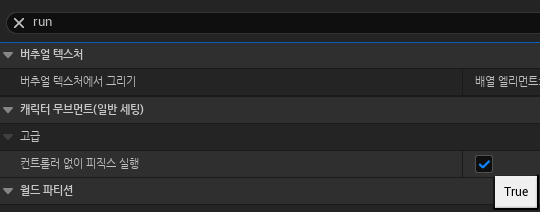
그리고 방향만 바뀌고 위치는 안바꾸는 버그가 있는데, AddMovementInput이 적용이 안되기 때문.
player와 myplayer 블루프린트를 열어서 컨트롤러 없이 피직스 실행 을 체크하면 된다.
이외에도 움직이다보면 내 클라이언트 상에서 보이는 위치와 남들에게 보이는 위치가 차이난다.
아무튼 중요한건 위치를 그냥 텔레포트 하듯이 이동시키는게 아니라 보정을 해서 자연스러운 이동을 구현해야 하는것.
'강의 수강 > 게임서버(2)' 카테고리의 다른 글
| 5. Job (0) | 2026.03.20 |
|---|---|
| 3. 입장과 퇴장 (0) | 2026.01.19 |
| 2. 서버 연동 기초 (0) | 2026.01.10 |
| 01. OT ~ 05.복습#4 (0) | 2026.01.06 |