서론

지금 윈도우 pc가 고장나서 게임서버나 클라이언트쪽은 건드릴 수 없는 상황이 되었다.
그러니 일단 맥북으로도 개발할 수 있는 인증서버를 만들어보자.
개발에 앞서서 인증서버는 debian-slim이나 alpine컨테이너에서 돌아가도록 하고싶기 때문에 도커 환경을 구축할 필요가 있다. 특히 epoll과 같이 본래 mac에는 없는 기능을 쓰면서 개발하려면 필수적이다. 그래서 우선 debian 환경에서 개발할 수 있는 준비를 마치도록 한다.
본 게시글은 이미 마친 일들을 정리한것으로, 수많은 삽질이 있었다...
목표
- 도커로 데비안 컨테이너 띄우기
- 간단한 c++ 프로그램 빌드, 실행해보기
- 인증서버에서 사용할 라이브러리들 설치 및 동작 확인하기
- 도커파일, 컴포즈파일로 환경 구성 반 자동화 하기
도커로 데비안 띄우기
거창하게 목표라고 적어놨지만 매우 쉽다.
1. 도커 데스크탑 설치
docker.com 에서 설치한다.
2. 데비안 이미지 pull
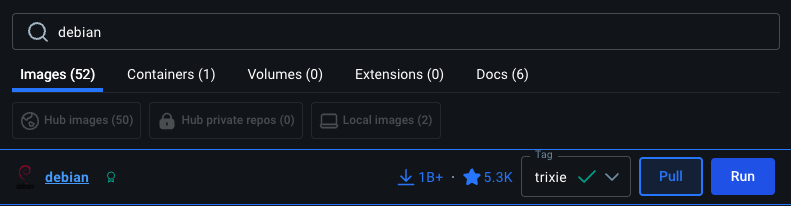
도커 데스크탑에 debian 검색해서 trixie 버전으로 설치했다
3. 이미지로 컨테이너 띄우고 들어가기
docker run -it debian:trixie /bin/bash
간단한 c++ 프로그램 빌드, 실행해보기
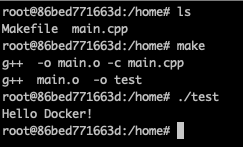
c++ 코드를 컴파일해서 Hello Docker! 를 출력해보자.
gcc g++과 Makefile사용을 위한 make 설치하자. 그리고 당장은 IDE연결이 안돼있으니 vim도 설치하자.
apt update
apt install -y gcc g++ make vim
Makefile
메이크파일은 맥에서 테스트용으로 쓰던걸 복붙해왔다.
NAME = test

SRC = main.cpp
OBJ = $(SRC:.cpp=.o)

CXX = g++
CXXFLAGS =
LDLIBS =

all : $(NAME)

$(NAME) : $(OBJ)
	$(CXX) $(CXXFLAGS) $(OBJ) $(LDLIBS) -o $(NAME)

%.o : %.cpp
	$(CXX) $(CXXFLAGS) -o $@ -c $<

%.o : %.cc
	$(CXX) $(CXXFLAGS) -o $@ -c $<

clean :
	rm -rf $(OBJ) $(COBJ)

fclean : clean
	rm -rf $(NAME)

re : fclean all

.PHONY : all clean fclean re
main.cpp
#include <iostream>

int main()
{
	std::cout << "Hello Docker!" << std::endl;
}
인증서버에서 사용할 라이브러리들 설치 및 동작 확인하기
앞으로 구현하다보면 뭐가 더 필요할 수도 있지만 일단 알고있는 것만 설치했다.
apt install -y libhiredis-dev libpq-dev protobuf-compiler libprotobuf-dev- libpq-dev : postgreSQL C 클라이언트 개발 패키지
- libhiredis-dev : redis C 클라이언트 개발 패키지
- protobuf-compiler : proto 파일로 pb.cc, pb.h 파일을 생성해주는 protobuf용 코드생성기
- libprotobuf-dev : protoc가 생성한 코드가 동작하기 위해 필요한 c++ 런타임 라이브러리
이제 각 라이브러리를 잘 갖다 쓰는지 하나씩 셈플코드를 빌드해보자.
원래 실행도 시켜볼려했는데 compose up으로 postgres redis 컨테이너들을 동시에 띄워야 도커네트워크로 연결된다. 그래서 실행은 다음에 도커파일, 도커컴포즈 설정한 다음에 해보자. 이번엔 빌드만 해본다.
libpq
라이브러리는 아까 설치했으니 컴파일러가 헤더를 찾을 수있게 환경변수에 CPATH=/usr/include/postgresql 추가해준다. 헤더파일 설치 경로는 환경마다 다를거니까 유의. 나는 debian:trixie 컨테이너에서 작업중이다.
export CPATH=/usr/include/postgresql지금은 export로 추가해봐야 터미널 닫으면 증발해버리지만 나중에 도커 컴포즈 파일로 환경변수에 추가되도록 만들면 된다.
Makefile
링크할 때 라이브러리 쓰도록 Makefile에서도 수정해준다. 자세한내용은 아까 Makefile 참조하자
...
LDLIBS = -lpq
...코드는 https://www.postgresql.org/docs/17/libpq-example.html postgres 17 문서에서 가져왔다.
/*
 * src/test/examples/testlibpq.c
 *
 *
 * testlibpq.c
 *
 *      Test the C version of libpq, the PostgreSQL frontend library.
 */
#include <stdio.h>
#include <stdlib.h>
#include "libpq-fe.h"

static void
exit_nicely(PGconn *conn)
{
    PQfinish(conn);
    exit(1);
}

int
main(int argc, char **argv)
{
    const char *conninfo;
    PGconn     *conn;
    PGresult   *res;
    int         nFields;
    int         i,
                j;

    /*
     * If the user supplies a parameter on the command line, use it as the
     * conninfo string; otherwise default to setting dbname=postgres and using
     * environment variables or defaults for all other connection parameters.
     */
    if (argc > 1)
        conninfo = argv[1];
    else
        conninfo = "dbname = postgres";

    /* Make a connection to the database */
    conn = PQconnectdb(conninfo);

    /* Check to see that the backend connection was successfully made */
    if (PQstatus(conn) != CONNECTION_OK)
    {
        fprintf(stderr, "%s", PQerrorMessage(conn));
        exit_nicely(conn);
    }

    /* Set always-secure search path, so malicious users can't take control. */
    res = PQexec(conn,
                 "SELECT pg_catalog.set_config('search_path', '', false)");
    if (PQresultStatus(res) != PGRES_TUPLES_OK)
    {
        fprintf(stderr, "SET failed: %s", PQerrorMessage(conn));
        PQclear(res);
        exit_nicely(conn);
    }

    /*
     * Should PQclear PGresult whenever it is no longer needed to avoid memory
     * leaks
     */
    PQclear(res);

    /*
     * Our test case here involves using a cursor, for which we must be inside
     * a transaction block.  We could do the whole thing with a single
     * PQexec() of "select * from pg_database", but that's too trivial to make
     * a good example.
     */

    /* Start a transaction block */
    res = PQexec(conn, "BEGIN");
    if (PQresultStatus(res) != PGRES_COMMAND_OK)
    {
        fprintf(stderr, "BEGIN command failed: %s", PQerrorMessage(conn));
        PQclear(res);
        exit_nicely(conn);
    }
    PQclear(res);

    /*
     * Fetch rows from pg_database, the system catalog of databases
     */
    res = PQexec(conn, "DECLARE myportal CURSOR FOR select * from pg_database");
    if (PQresultStatus(res) != PGRES_COMMAND_OK)
    {
        fprintf(stderr, "DECLARE CURSOR failed: %s", PQerrorMessage(conn));
        PQclear(res);
        exit_nicely(conn);
    }
    PQclear(res);

    res = PQexec(conn, "FETCH ALL in myportal");
    if (PQresultStatus(res) != PGRES_TUPLES_OK)
    {
        fprintf(stderr, "FETCH ALL failed: %s", PQerrorMessage(conn));
        PQclear(res);
        exit_nicely(conn);
    }

    /* first, print out the attribute names */
    nFields = PQnfields(res);
    for (i = 0; i < nFields; i++)
        printf("%-15s", PQfname(res, i));
    printf("\n\n");

    /* next, print out the rows */
    for (i = 0; i < PQntuples(res); i++)
    {
        for (j = 0; j < nFields; j++)
            printf("%-15s", PQgetvalue(res, i, j));
        printf("\n");
    }

    PQclear(res);

    /* close the portal ... we don't bother to check for errors ... */
    res = PQexec(conn, "CLOSE myportal");
    PQclear(res);

    /* end the transaction */
    res = PQexec(conn, "END");
    PQclear(res);

    /* close the connection to the database and cleanup */
    PQfinish(conn);

    return 0;
}

잘 빌드된다.
libhiredis
마찬가지로 라이브러리는 아까 설치했으니 컴파일러가 헤더를 찾을 수있게 환경변수에 CPATH에 /usr/include/hiredis를 추가해준다. 이전에 추가한게 날아가지 않도록 명령어를 이렇게 써야한다.
export CPATH=/usr/include/hiredis:$CPATHMakefile도 아까처럼 수정해준다.
...
LDLIBS = -lpq -lhiredis
...코드는 https://redis.io/docs/latest/develop/clients/hiredis/ redis 문서에서 가져왔다
코드에 틀린부분이 있으니 reply = redisCommand(어쩌구); 부분을 reply = (redisReply*)redisCommand(어쩌구);
로 바꿔줘야한다. 두군데 있다. 아래 코드는 수정해놓음.
#include <stdio.h>
#include <stdlib.h>

#include <hiredis/hiredis.h>

int main() {
    // The `redisContext` type represents the connection
    // to the Redis server. Here, we connect to the
    // default host and port.
    redisContext *c = redisConnect("127.0.0.1", 6379);

    // Check if the context is null or if a specific
    // error occurred.
    if (c == NULL || c->err) {
        if (c != NULL) {
            printf("Error: %s\n", c->errstr);
            // handle error
        } else {
            printf("Can't allocate redis context\n");
        }

        exit(1);
    }

    // Set a string key.
    redisReply *reply = (redisReply*)redisCommand(c, "SET foo bar");
    printf("Reply: %s\n", reply->str); // >>> Reply: OK
    freeReplyObject(reply);

    // Get the key we have just stored.
    reply = (redisReply*)redisCommand(c, "GET foo");
    printf("Reply: %s\n", reply->str); // >>> Reply: bar
    freeReplyObject(reply);

    // Close the connection.
    redisFree(c);
}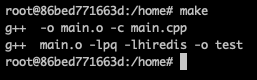
잘 빌드된다.
protobuf
이번엔 다른 컨테이너가 필요없으니 실행도 해보자.
헤더는 알아서 찾으니 이번엔 CPATH를 건들일 필요 없다.
make파일 수정
SRC = main.cpp test.pb.cc
OBJ = $(SRC:.cpp=.o)
OBJ := $(OBJ:.cc=.o)
...
LDLIBS = -lhiredis -lpq -lprotobuf
...
먼저 protoc 가 잘 작동하는지 확인하자
protoc는 proto파일로 pb.cc pb.h 파일을 생성하는 코드생성기다.
test.proto 파일 만들기
syntax = "proto3";

message User {
  int32 id = 1;
  string name = 2;
}
protoc --cpp_out=. test.proto
프로토파일로 c파일을 만들었다.
이제 테스트 코드로 빌드가 잘 되는지 확인하자.
#include <iostream>
#include "test.pb.h"

int main() {
    User user;

    user.set_id(1);
    user.set_name("Alice");

    std::cout << "User id: " << user.id() << std::endl;
    std::cout << "User name: " << user.name() << std::endl;

    return 0;
}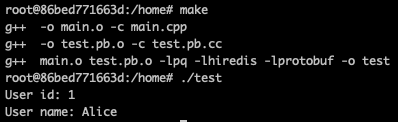
컴파일도 잘 되고 실행도 잘 된다.
'프로젝트 > Project_Island' 카테고리의 다른 글
| 5. WriteBuffer와 Send작업 (0) | 2026.03.02 |
|---|---|
| 4. epoll기반 서버 기초다지기 (0) | 2026.03.01 |
| 3. 인증서버 설계를 위한 공부 (0) | 2026.02.21 |
| 2. Docker 기반 Debian 개발환경 구축(2) +vscode (0) | 2026.02.20 |
| 0. 포폴용 게임을 만들어보자! (0) | 2026.02.20 |