지난번에 두가지 남은 목표가 있었는데 TLS 적용을 마쳤고, 이번엔 DBConnection을 만들어보자.
DB는 postgres와 redis를 쓸것인데, 각 db서버는 맥북의 컨테이너에서 돌아가기 때문에 DB서버의 설치과정은 적지 않는다.
사용할 라이브러리 vcpkg로 설치
vcpkg install libpq
vcpkg install hiredis
헤더
#include <hiredis/hiredis.h>
#include <libpq-fe.h>
헤더파일들 실제 위치
C:\vcpkg\installed\x64-windows\includeConnection 클래스 추가
인증서버의 것을 그대로 가져왔다. 99퍼센트 똑같다. 다른건 int를 int32로 바꿨다던지 그런것 뿐.
PGConnection 클래스 추가
#pragma once

#include <libpq-fe.h>

class PGConnection
{
public:
	PGConnection() {}
	~PGConnection();

	bool		Connect(const char* connectionString);
	void		Clear();
	void		ClearValues();

	void		AddValue(const string& val);
	bool		ExecuteSQL(const string& sql);
	int32			GetRowCount();
	string		GetValue(int32 row, int32 col);
	bool		IsNull(int32 row, int32 col);

private:
	PGconn* _connection = nullptr;
	PGresult* _result = nullptr;
	vector<string> _values;
};
RedisConnection 클래스 추가
#pragma once

#include <hiredis/hiredis.h>
#include <string>

class RedisConnection
{
public:
	RedisConnection() {}
	~RedisConnection();

	bool	Connect(const char* ip, int32 port);
	void	Clear();

	string	GetStr() { return _reply->str; }
	size_t	GetStrLen() { return _reply->len; }
	int64	GetInt() { return _reply->integer; }
	bool	IsNull() { return _reply->type == REDIS_REPLY_NIL; }
	//elements는 어떻게 할까 흠. 일단 인증서버에선 안씀.

	template<typename... Args>
	bool	Execute(const string& query, Args&&... args)
	{
		_reply = (redisReply*)redisCommand(_connection, query.c_str(), forward<Args>(args)...);
		if (IsReplyError())
		{
			Clear();
			return false;
		}
		return true;
	}

private:
	bool	IsReplyError();

private:
	redisContext* _connection = nullptr;
	redisReply* _reply = nullptr;
};
cpp는 깃허브를 참조하자.
DBConnectionPool 추가
마찬가지로 99퍼센트 똑같다.
#pragma once

#include "PGConnection.h"
#include "RedisConnection.h"

class DBConnectionPool
{
public:
	DBConnectionPool() {}
	~DBConnectionPool() {}

	bool	Init(int32 maxRedis, const char* redisIp, int32 redisPort,
		int32 maxPostgres, const char* pgConString);

	void	Push(PGConnection** conn);
	void	Push(RedisConnection** conn);

	PGConnection* PopPG();
	RedisConnection* PopRedis();
private:
	mutex	_mPostgres;
	int32	_maxPostgres;
	string	_pgConString;

	mutex	_mRedis;
	int32	_maxRedis;
	string	_redisIp;
	int32	_redisPort;

	vector<PGConnection*>		_postgresConnections;
	vector<RedisConnection*>	_redisConnections;
};
CoreGlobal 추가
DBConnection 풀에 전역적으로 접근할 수 있도록 CoreGlobal을 만들어주자.
CoreGlobal.h
#pragma once

extern class DBConnectionPool* GDBConnectionPool;
CoreGlobal.cpp
#include "pch.h"
#include "CoreGlobal.h"
#include "DBConnectionPool.h"

DBConnectionPool* GDBConnectionPool = nullptr;

class CoreGlobal
{
public:
	CoreGlobal()
	{
		GDBConnectionPool = new DBConnectionPool();
	}
	~CoreGlobal()
	{
		delete GDBConnectionPool;
	}
}	GcoreGlobal;
게임서버의 main에서 Init을 호출해줘야한다.
ip주소는 맥북의 주소이고, 도커 컴포즈파일에 설정한 포트포워딩으로 redis컨테이너와 postgresql 컨테이너에 연결한다.
/*...*/
#include "DBConnectionPool.h"

int main()
{
	cout << "=== Server ===" << endl;
	ClientPacketHandler::Init();
	GDBConnectionPool->Init(10, "192.168.0.38", 6379, 10,
		"host=192.168.0.38 user=postgres port=5432 "
		"dbname=postgres password=password "
		"connect_timeout=3");
	/*...*/
}
테스트
postgres는 기존 db에 담겨있던 데이터를 출력해봤고, redis는 키벨류 값을 저장하고 출력해봤다.
int main()
{
	PGConnection pg;
	cout << "Postgres TEST" << endl;
	bool ret = pg.Connect("host=192.168.0.38 user=postgres port=5432 "
		"dbname=postgres password=password "
		"connect_timeout=3");

	string pgGetUserIdSQL = "SELECT email FROM auth.users WHERE nickname = $1";

	string nickname = "dodontak";
	pg.AddValue(nickname);

	pg.ExecuteSQL(pgGetUserIdSQL);
	int rowCount = pg.GetRowCount();
	string email;
	email = pg.GetValue(0, 0);
	cout << email << endl;

	cout << endl;
	cout << "redis TEST" << endl;
	RedisConnection redis;
	redis.Connect("192.168.0.38", 6379);
	string	redisSetNickname = "SET %s:nickname %s EX 300";
	redis.Execute(redisSetNickname, "1000", "dodontak");
	redis.Clear();

	string	redisGetNickname = "Get %s:nickname";
	redis.Execute(redisGetNickname, "1000");
	string name = redis.GetStr();
	cout << name << endl;

}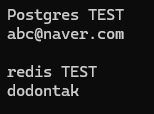
데비안에서 작업해놓은 코드를 윈도우에서 그대로 쓰는지라 잘 안돌아가면 어쩌나 걱정했는데 아주 잘 돌아가서 다행이다.
현재까지의 git 버전
Feat: DBConnection, Pool · Dodontak/Project_Island_GameServer@2744044
추가된 클래스 PGConnection RedisConnection DBConnectionPool 인증서버의 것과 100퍼센트 똑같다. CoreGlobal - DBConnectionPool을 글로벌 변수로 관리. GameServer - GDBConnectionPool->Init 추가. redis와 postgresql 커넥션 스트
github.com
서버 코어는 끝난 것 같다!
이제 게임 컨텐츠 구상과 proto파일에 프로토콜을 구성을 하자.
'프로젝트 > Project_Island' 카테고리의 다른 글
| 41. Room, Player 만들기, TLS 버그해결 (0) | 2026.04.14 |
|---|---|
| 40. 외부 라이브러리들 dll -> lib 변경 (0) | 2026.04.13 |
| 38. TLS 적용하기 (0) | 2026.04.05 |
| 37. PacketHandler 테스트 (0) | 2026.04.04 |
| 36. PacketHandler추가, 코드 자동화 (0) | 2026.04.03 |